
Key Takeaways
A key part of Agent Builder is its memory system. In this article we cover our rationale for prioritizing a memory system, technical details of how we built it, learnings from building the memory system, what the memory system enables, and discuss future work.
We launched LangSmith Agent Builder this week as a no-code way to build agents. A key part of Agent Builder is it’s memory system. In this article we cover our rationale for prioritizing a memory system, technical details of how we built it, learnings from building the memory system, what the memory system enables, and discuss future work.
What is LangSmith Agent Builder
LangSmith Agent Builder is a no-code agent builder. It’s built on top of the Deep Agents harness. It is a hosted web solution targeted at technically lite citizen developers. In LangSmith Agent Builder, builders will create an agent to automate a particular workflow or part of their day. Examples include an email assistant, a documentation helper, etc.
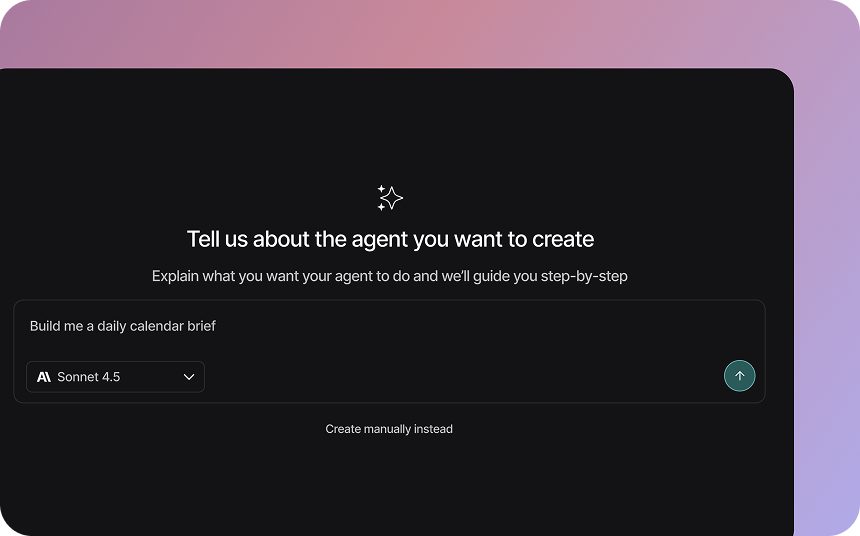
Early on we made a conscious choice to prioritize memory as a part of the platform. This was not an obvious choice – most AI products launch initially without any form of memory, and even adding it in hasn’t yet transformed products like some may expect. The reason we prioritized it was due to the usage patterns of our users.
Unlike ChatGPT or Claude or Cursor, LangSmith Agent Builder is not a general purpose agent. Rather, it is specifically designed to let builders customize agents for particular tasks. In general purpose agents, you are doing a wide variety of tasks that may be completely unrelated, so learnings from one session with the agent may not be relevant for the next. When a LangSmith Agent is doing a task, it is doing the same task over and over again. Lessons from one session translate to the next at a much higher rate. In fact, it would be a bad user experience if memory is not present – that would mean you would have to repeat yourself over and over to the agent in different sessions.
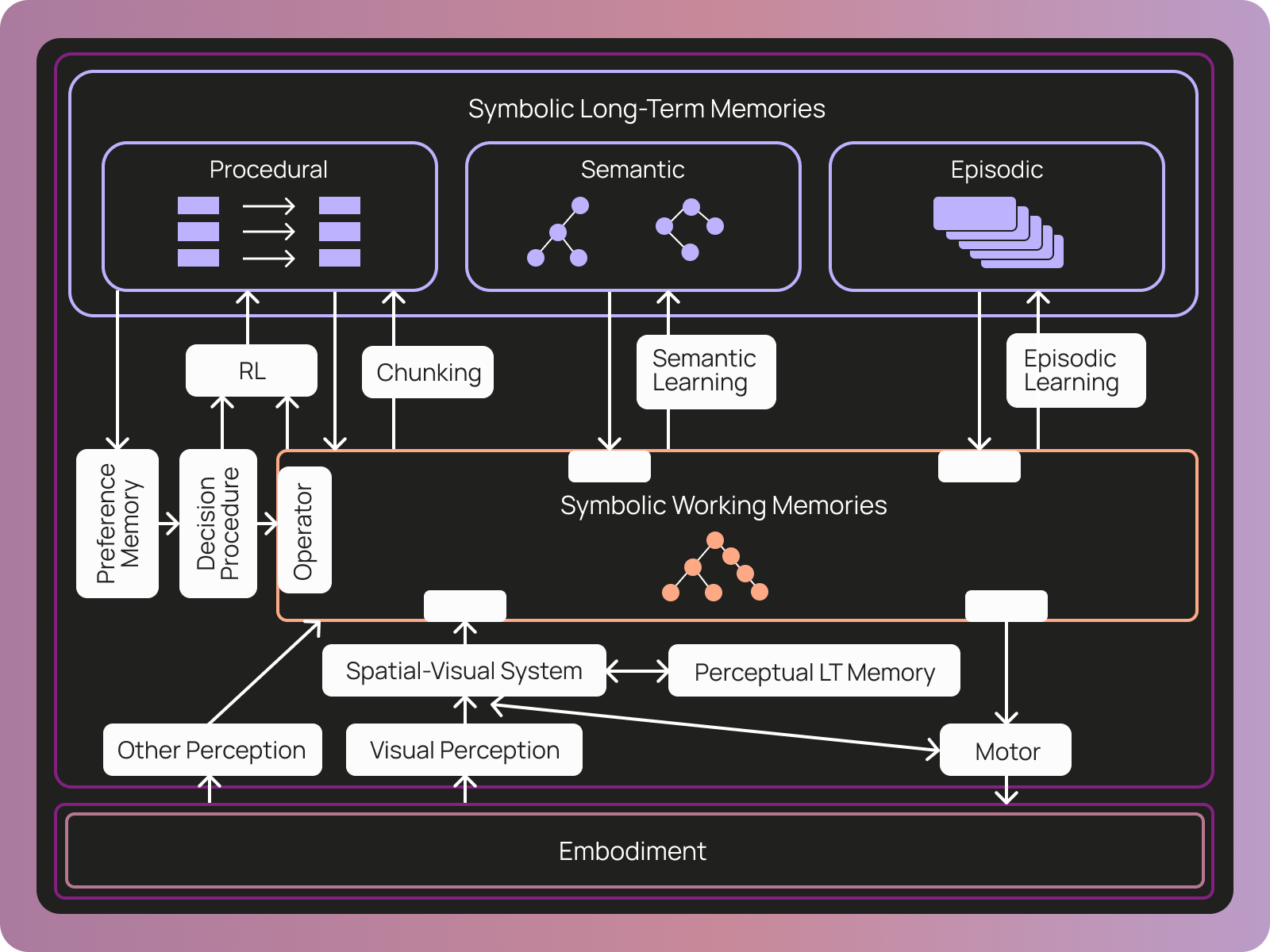
When thinking about what exactly memory would even mean for LangSmith Agents, we turned to a third party definition of memory. The COALA paper defines memory for agents in three categories:
- Procedural: the set of rules that can be applied to working memory to determine the agent’s behavior
- Semantic: facts about the world
- Episodic: sequences of the agent’s past behavior
How we built our memory system
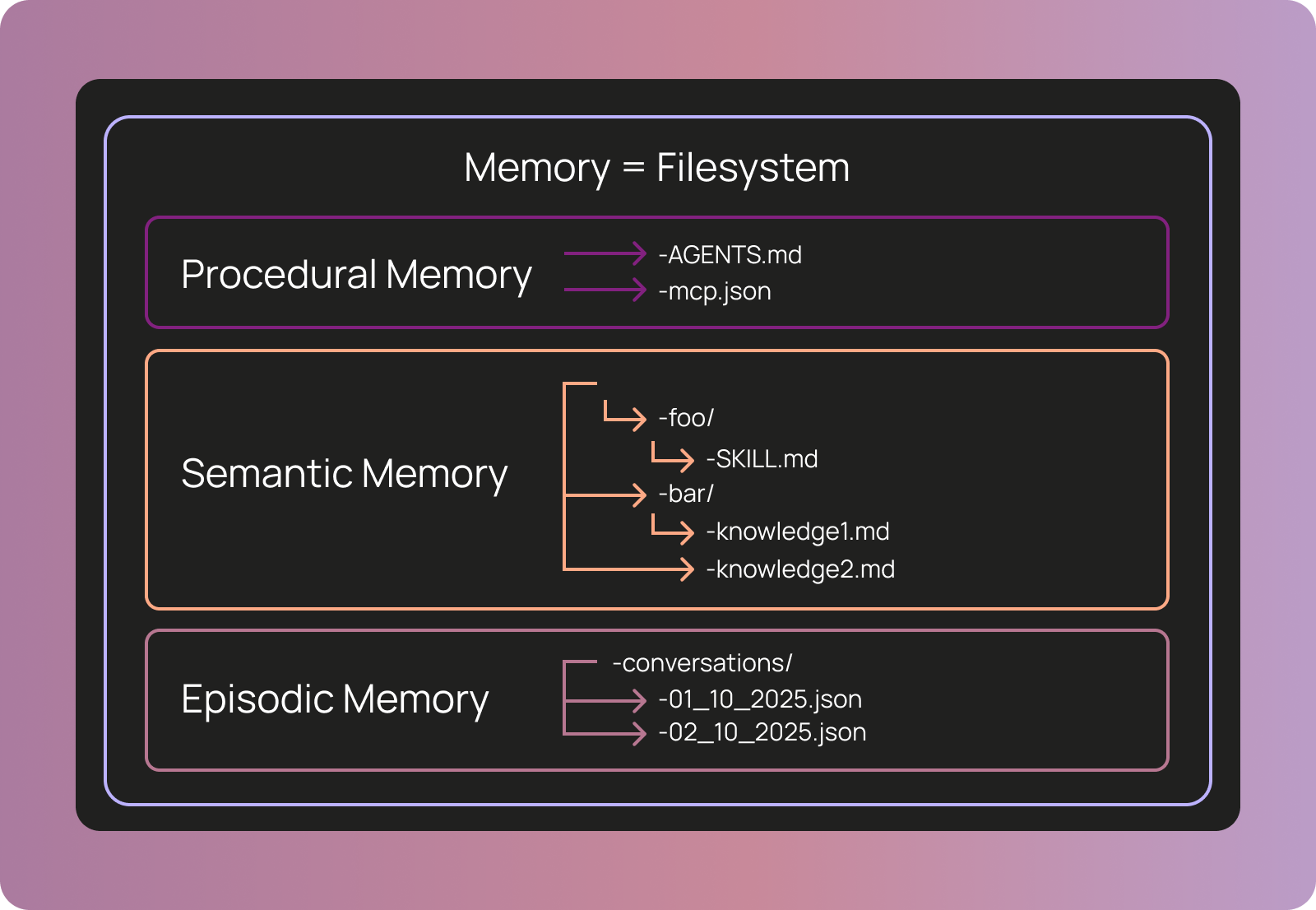
We represent memory in Agent Builder as a set of files. This is an intentional choice to take advantage of the fact that models are good at using filesystems. In this way, we could easily let the agent read and modify its memory without having to give it specialized tools - we just give it access to the filesystem!
When possible, we try to use industry standards. We use AGENTS.md to define the core instruction set for the agent. We use agent skills to give the agents particular specialized instructions for specific tasks. There is no subagent standard, but we use a similar format to Claude Code. For MCP access, we use a custom tools.json file. The reason we use a custom tools.json file and not the standard mcp.json is that we want to allow users to give the agent only a subset of the tools in an MCP server to avoid context overflow.
We actually do not use a real filesystem to store these files. Rather, we store them in Postgres and expose them to the agent in the shape of a filesystem. We do this because LLMs are great at working with filesystems, but from an infrastructure perspective it is easier and more efficient to use a database. This “virtual filesystem” is natively supported by DeepAgents - and is completely pluggable so you could bring any storage layer you want (S3, MySQL, etc).
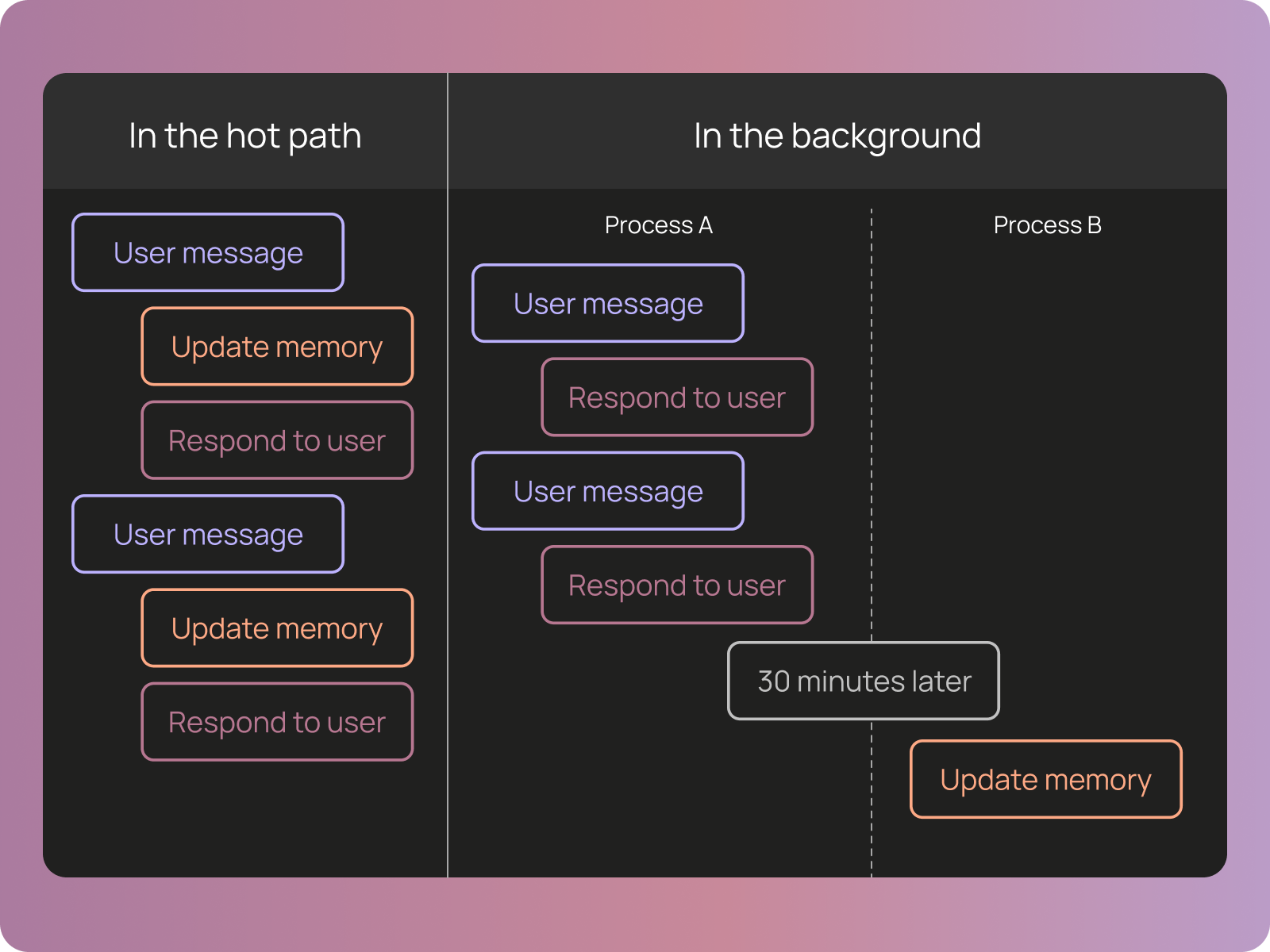
We also allow users (and agents themselves) to write other files to an agent’s memory folder. These files can contain arbitrary knowledge as well, that the agent can reference as it runs. The agent would edit these files as it’s working, “in the hot path”.
The reason it is possible to build complicated agents without any code or any domain specific language (DSL) is that we use a generic agent harness like Deep Agents under the hood. Deep Agents abstracts away a lot of complex context engineering (like summarization, tool call offloading, and planning) and lets you steer your agent with relatively simple configuration.
These files map nicely on to the memory types defined in the COALA paper. Procedural memory – what drives the core agent directive – is AGENTS.md and tools.json. Semantic memory is agent skills and other knowledge files. The only type of memory missing is episodic memory, which we didn’t think was as important for these types of agents as the other two.
What agent memory in a file system looks like
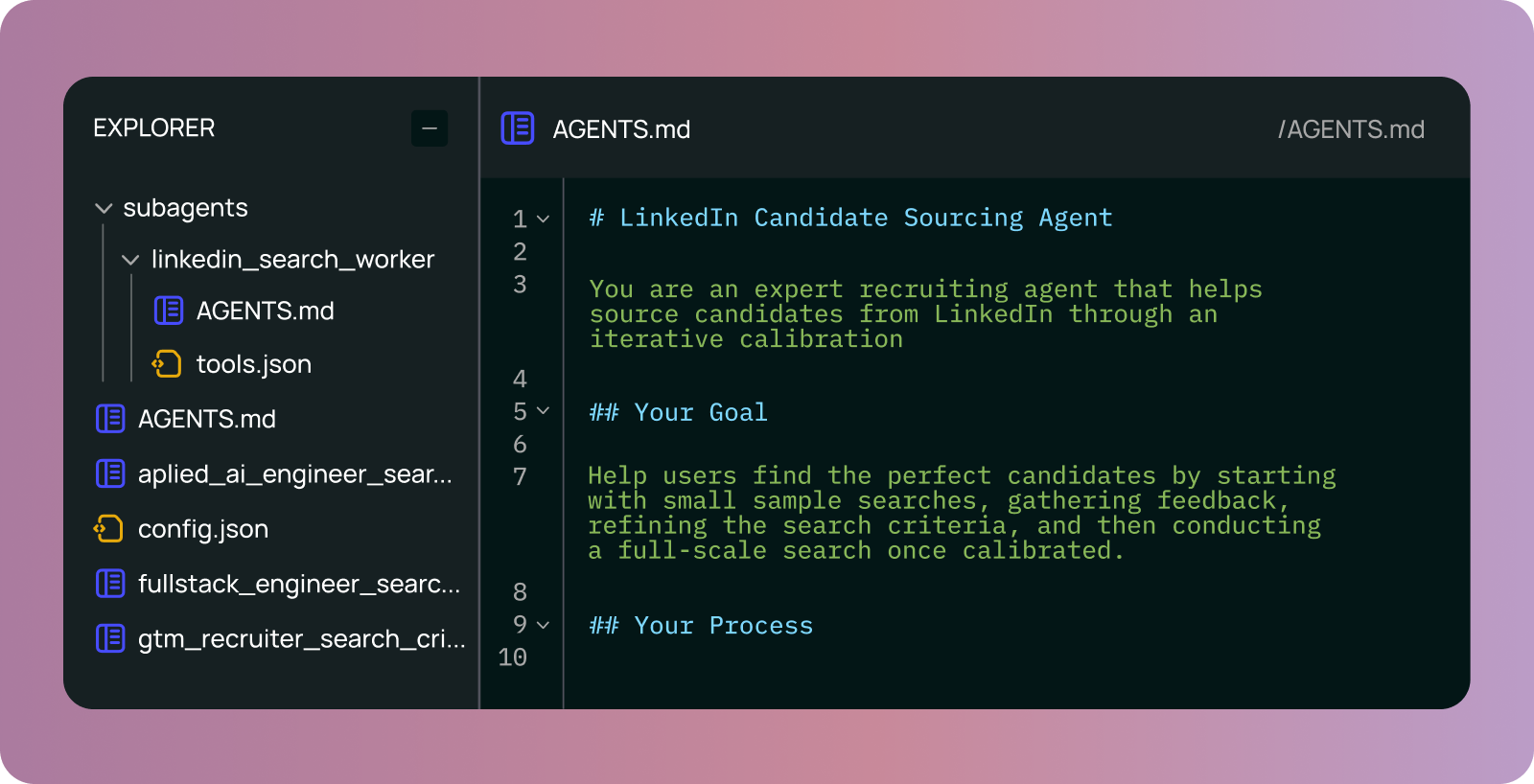
We can look at a real agent we’ve been using internally – a LinkedIn recruiter – built on LangSmith Agent Builder.
- AGENTS.md: defines the core agents instructions
subagents/: defines only one subagentlinkedin_search_worker: after the main agent is calibrated on a search, it will kick off this agent to source ~50 candidates.
tools.json: defines an MCP server with access to a LinkedIn search tool- There are also currently 3 other files in the memory, representing JDs for different candidates. As we’ve worked with the agent on these searches, it has updated and maintained those JDs.
How memory editing works: a concrete example
To make it more concrete how memory works, we can walk through an illustrative example.
Start:
You start with a simple AGENTS.md:
Summarize meeting notes.
Week 1:
The agent produces paragraph summaries. You correct it: "Use bullet points instead." The agent edits AGENTS.md to be:
# Formatting Preferences
User prefers bullet points for summaries, not paragraphs.
Week 2:
You ask the agent to summarize a different meeting. It reads its memory and uses bullet points automatically. No reminder needed. During this session, you ask it to: "Extract action items separately at the end." Memory updates:
# Formatting Preferences
User prefers bullet points for summaries, not paragraphs.
Extract action items in separate section at end.
Week 4:
Both patterns apply automatically. You continue adding refinements as new edge cases surface.
Month 3:
The agent's memory includes:
- Formatting preferences for different document types
- Domain-specific terminology
- Distinctions between "action items", "decisions", and "discussion points"
- Names and roles of frequent meeting participants
- Meeting type handling (engineering vs. planning vs. customer)
- Edge case corrections accumulated through use
The memory file might look like:
# Meeting Summary Preferences

## Format
- Use bullet points, not paragraphs
- Extract action items in separate section at end
- Use past tense for decisions
- Include timestamp at top

## Meeting Types
- Engineering meetings: highlight technical decisions and rationale
- Planning meetings: emphasize priorities and timelines
- Customer meetings: redact sensitive information
- Short meetings (<10 min): just key points

## People
- Sarah Chen (Engineering Lead) - focus on technical details
- Mike Rodriguez (PM) - focus on business impact
...
The AGENTS.md built itself through corrections, not through upfront documentation. We arrived iteratively at an appropriately detailed agent specification, without the user ever manually changing the AGENTS.md.
Learnings from building this memory system
There are several lessons we learned along the way.
The hardest part is prompting
The hardest part of building an agent that could remember things is prompting. In almost all cases where the agent was not performing well, the solution was to improve the prompt. Examples of issues that were solved this way:
- The agent was not remembering when it should
- The agent was remembering when it should not
- The agent was writing too much to AGENTS.md instead of to skills
- The agent did not know the right format for skills files
- … many more
We had one person working full time on prompting for memory (which was a large percentage of the team).
Validate file types
Several files have specific schemas they need to abide by (tools.json needs to have valid MCP servers, skills needs to have proper frontmatter, etc). We saw that Agent Builder sometimes forgot this, and as a result generated invalid files. We added a step to explicitly validate these custom shapes, and, if validation failed, throw any errors back to the LLM instead of committing the file.
Agents were good at adding things to files, but didn’t compact
Agents were editing their memory as they worked. They were pretty good at adding specific things to files. One thing they were not good at, however, was realizing when to compact learnings. For example: my email assistant at one point started listing out all specific vendors it should ignore cold outreach from, instead of updating itself to ignore all cold outreach.
Explicit prompting is still sometimes useful as an end user
Even with the agent being able to update its memory as it worked, there were still several cases where (as an end user) we found it useful to prompt the agent explicitly to manage its memory. One such case was at the end of its work to reflect on the conversation and update its memory for any things it may have missed. Another case was to prompt it to compact its memory, to solve for the case where it was remembering specific cases but not generalizing.
Human-in-the-loop
We made all edits to memory human-in-the-loop – that is, we require explicit human approval before updating. This was largely done to minimize the potential attack vector of prompt injection. We do expose a way for users to turn this off (”yolo mode”) in cases where they aren’t as worried about this.
What this enables
Besides a better product experience, representing memory in this way enables a number of things.
No-code experience
One of the issues with no-code builders is that they require you to learn an unfamiliar DSL that does not scale well with complexity. By representing the agent as markdown and json files, the agent is now in a format that (a) is familiar to most technically-lite people, (b) more scalable.
Better agent building
Memory actually allows for a better agent building experience. Agent building is very iterative – in large part because you don’t know what the agent will do until you try it. Memory makes iteration easier, because rather than manually updating the agent configuration every time, you can just give feedback in natural language and it will update itself.
Portable agents
Files are very portable! This allows you to easily to port agents built in agent builder to other harnesses (as long as they use the same file conventions). We tried to use as many standard conventions as possible for this reason. We want to make it easy to use agents built in agent builder in the Deep Agents CLI, for example. Or other agent harnesses completely, like Claude Code or OpenCode.
Future directions
There are a lot of memory improvements we want to get to that we did not have time or enough confidence to get in before the launch.
Episodic memory
The one COALA memory type Agent Builder is missing is episodic memory: sequences of the agent’s past behavior. We plan to do this by exposing previous conversations as files in the filesystem that the agent can interact with.
Background memory processes
Right now, all memory is update “in the hot path”; that is, as the agent runs. We want to add a process that runs in the background (probably some cron job, running once a day or so) to reflect over all conversations and update memory. We think this will catch items that the agent fails to recognize in the moment, and will be particularly useful for generalizing specific learnings.
`/remember`
We want to expose an explicit /remember command so you can prompt the agent to reflect on the conversation and update its memory. We found ourselves doing this occasionally with great benefits, and so want to make it easier and more encouraged.
Semantic search
While being able to search memories with glob and grep is a great starting point, there are some situations where allowing the agent to do a semantic search over its memory would provide some gains.
Different levels of memory
Right now, all memory is specific for that agent. We have no concept of user-level or org-level memory. We plan to do this by exposing specific directories to the agent that represent these types of memory, and prompting the agent to use and update those memories accordingly.
Conclusion
If building agents that have memory sounds interesting, please try out LangSmith Agent Builder. If you want to help us build this memory system, we are hiring.