AI Agent Observability: Tracing, Testing, and Improving Agents
April 7, 2026
Key Takeaways
- Most agent debugging workflows still assume engineers will sift through logs to find root causes, but production trace volume makes this approach unsustainable.
- The fastest teams turn observations into action: they capture production traces, analyze them to find patterns, build test datasets from real usage, run evaluations to measure quality, and use those results to drive improvements.
- AI-assisted debugging lets you ask "why did the agent do this?" in natural language and get answers in seconds, streamlining troubleshooting.
Managing trace volume is a growing workflow challenge. The most successful teams solve for this by connecting observation to action: capturing production traces, building test datasets from real usage, and running evaluations that drive targeted improvements. This article walks through what to instrument, how to evaluate agent quality, and how AI-assisted debugging accelerates root cause analysis.
What is agent observability?
Agent observability provides step-by-step visibility into execution. It shows which tools were called, what data was retrieved, where reasoning stayed on track, and where it diverged from the intended path. This visibility matters because AI agents are non-deterministic. Unlike traditional software, where you trace inputs through predictable logic to find a bug, the same agent input can trigger different tool sequences, retrieve different documents, and generate different responses each time. Without observability, you're left guessing why an agent failed based on its final output alone.
Where observability delivers value
- Localize failures: See exactly which step in a multi-step workflow caused a failure, whether the retrieval returned irrelevant documents, the model hallucinated a tool parameter, or the reasoning loop failed to converge.
- Systematic improvement: Capture traces that represent real production behavior and convert them into regression tests.
- Cost and latency attribution: Identify that a specific sub-task is consuming 80% of your input and output tokens per trace or adding 3 seconds of tool call latency.
Traditional observability tools capture request-response cycles but fall short for AI agents. When your agent invokes three tools, loops twice, and hallucinates a billing policy, standard APM traces show what happened but not why. Agent observability closes this gap by instrumenting the decision-making layer itself, tracking tool calls, prompt versions, context retrieval, and model outputs as structured traces.
When you need agent observability: from prototyping to production scale
During prototyping, print statements are sufficient. You're testing locally, watching executions as they happen, and debugging one run at a time. When something breaks, you can add additional logging and rerun immediately. This approach works because you're handling a manageable volume of traces.
Pre-production shifts your requirements. Your agent starts encountering edge cases you didn't anticipate, like ambiguous queries, retrieval failures, and tool timeouts. Print statements can't keep up when you're running regression tests after every prompt change. At this stage, you need structured traces that capture tool calls, prompt versions, and model outputs. These traces let you compare how your agent behaves across different test runs without having to manually rerun everything.
Production makes observability non-negotiable. When a user reports 'the agent gave me the wrong answer,' you cannot reproduce the issue locally without access to the full execution context: conversation history, retrieval results, and model reasoning. Traces eliminate the guesswork. Observability also serves as your cost control mechanism. It tracks per-step token usage and latency, allowing you to identify expensive patterns before they drain your budget. For teams that have committed to SLAs, traces provide the only reliable way to prove compliance or diagnose violations when they occur.
As your production scale increases beyond 1,000 daily runs, you face a different challenge: volume overwhelms human capacity. You can no longer manually review every trace to spot problems. Automated pattern detection becomes essential to identify systemic issues, such as which retrieval queries consistently return low-quality results or which tool call sequences correlate with failures. Sampling strategies determine which traces to retain for deep analysis, while retention policies manage storage costs without losing critical debugging data. At this scale, observability infrastructure shifts from operational nice-to-have to a critical feature, enabling you to detect degradation before users report it.
When you don't need full observability
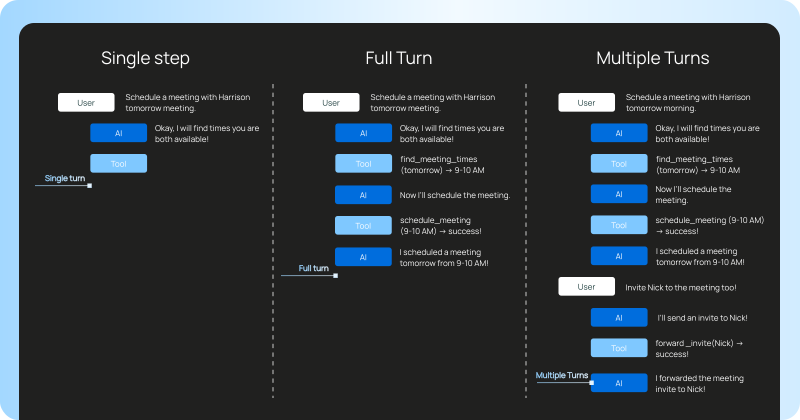
Not every agent application warrants a full tracing setup. If you're running a single-turn chain with one LLM call and no tool use, print statements and basic logging give you everything you need. The input-output relationship is direct enough that there's no hidden reasoning to trace.
Similarly, if you're still iterating on a prompt in a notebook and testing against a handful of examples, adding instrumentation creates overhead without much payoff. You can see the outputs right in front of you. Observability earns its keep when you can no longer hold the full execution in your head: multiple steps, multiple tools, or enough volume that you can't manually review every run.
The tipping point tends to be when at least one of these is true: your agent uses two or more tools in sequence, you're running more than a few dozen requests per day, or someone other than the original developer needs to debug failures. Before that threshold, keep it simple.
What to instrument in multi-step agents
According to our State of Agent Engineering report, 89% of organizations said they've implemented some form of agent observability, and 62% have detailed step-level tracing. That's table stakes now. These findings show that observability has become a standard practice across the industry, with most organizations moving beyond basic logging to implement granular tracing that captures the internal workings of their agents. This widespread adoption reflects a shared recognition that complex agent systems cannot be effectively debugged, optimized, or trusted without deep visibility into their execution.
Instrumentation categories
Effective instrumentation captures:
- LLM calls: Models and inputs, output completions, input and output tokens per trace, and tool call latency for every model invocation.
- Tool calls: Which tools were selected, what arguments were passed, what results were returned, and how long each call took. Tracking tool usage patterns over time reveals which capabilities AI agents rely on most.
- Retrieval steps: What queries were sent to vector stores or knowledge bases, what documents came back, and relevance signals if available. For RAG pipelines, this includes the full retrieval context that informed the agent's response.
- Reasoning transitions: How the agent decided to move from one step to another, with any intermediate chain-of-thought outputs captured.
- State changes: For stateful agents, what memory was read, what memory was written, and how state influenced subsequent decisions.
Capturing rich metadata alongside each step enables filtering and analysis. Tags for user segments, prompt versions, or deployment environments let you slice traces by the dimensions that matter for your use case.
Observability for Deep Agents and multi-agent systems
Observability makes agent execution fully inspectable. Deep Agents may execute hundreds of intermediate steps before producing a final answer. Without visibility into each step, you cannot determine where failures occur. Whether a customer support agent enters an infinite loop or a research agent confidently returns incorrect information, tracing tells you the exact sequence of decisions that led to the problem.
Multi-agent applications introduce additional complexity because failures can cascade across agent boundaries. Tracing needs to capture handoffs between agents and the full graph of execution across the system.
LangSmith, our framework agnostic observability platform traces show the full execution tree: every LLM call, tool invocation, retrieval step, and the reasoning that connected them. It goes beyond simple inputs and outputs to reveal the internal monologue of the agent and the exact parameters passed to the model at every step.
Baked-in tracing vs OpenTelemetry
OpenTelemetry (aka OTel) is becoming the default foundation for AI observability, driven by standardization and portability. Semantic conventions for generative AI systems provide a common vocabulary for describing LLM operations. Major vendors are converging on OTel-compatible instrumentation for your systems.
Tradeoffs between approaches
Choosing your tracing approach
LangSmith supports OTel to unify your observability stack across services. If you're already running a collector and want agent traces flowing through the same pipeline as your other backend services, OTel integration works.
For most teams starting fresh, the native SDK approach gets you running faster. Setting LANGSMITH_TRACING=true provides deeper trace integration with less configuration overhead. However, LangSmith supports both approaches because it's framework agnostic. You don’t have to use our open source frameworks like LangChain or LangGraph. Use your favorite framework and you’ll always get full trace visibility.
One caveat: while the core OpenTelemetry JavaScript API and SDK are stable, parts of the JavaScript instrumentation ecosystem are still evolving. Some auto-instrumentation libraries and framework integrations remain experimental and may change or behave inconsistently when combined with other tracing providers.
Why threads matter more than single traces
Threads connect related traces across conversations and sessions. By analyzing multi-turn interactions, you can see whether agents achieve user goals, retain context correctly, and progress toward successful outcomes. Single-trace analysis cannot capture these conversation-level patterns.
Multi-turn failure modes
Teams building customer success agents often find that failures span multiple turns. The first turn correctly identifies an issue. The second turn retrieves the right policy document. The third turn fails to apply that policy correctly to the specific customer's situation. Analyzing any individual trace in isolation gives an incomplete picture. The failure mode only becomes visible when you see the full conversation trajectory.
This shift changes what you measure. Instead of asking "did this request succeed?" you're asking "did this conversation achieve the user's goal?" The metrics change from tool call latency and error rates to session-level outcomes like resolution rate, escalation frequency, and goal completion.
LangSmith captures complete conversations with threads, grouping related traces by session ID so you can evaluate multi-turn behavior as a coherent unit. When you run automated scoring, you're assessing the entire conversation rather than isolated turns.
Evaluating agent performance
At production scale, evaluating your AI agents requires both LLM-as-a-judge approaches and code-based evaluations. LLM judges handle nuanced quality assessment like tone, accuracy, goal completion, and whether the response actually helped the user, while code-based evaluations handle objective, programmatically verifiable criteria.
Evaluation approaches
- LLM-as-a-judge: Define criteria like "Is the response concise?" or "Does it contain PII?" and have an LLM automatically grade thousands of historical runs. This scales quality assurance beyond human limitations while capturing subjective dimensions that code can't measure.
- Code evaluations: For objective criteria, write programmatic checks. Path convergence measurement provides a quantitative way to ensure AI agents follow efficient pathways.
- Multi-turn evaluations: Evaluate whether your agent achieved the user's goal across an entire conversation. These automatically score semantic intent, outcomes, and agent trajectory including tool calls. They run once a thread completes using your LLM-as-a-judge prompt.
- Online evaluations: Run evaluators on a sampled subset of live production traffic. This enables real-time detection of drift or quality degradation, acting as an early warning system for agent performance.
Building robust evaluation datasets
Evaluation datasets should include edge cases that stress-test agent behavior in real-world scenarios. Rare inputs and adversarial prompts often reveal failure modes that typical traffic never triggers.
Production evaluations also serve as guardrails. They catch model responses that violate safety policies or business rules before they reach users.
LangSmith Evaluation provides the infrastructure for all of these approaches. You can define custom evaluators, run them against datasets built from production traces, and track quality metrics over time. Metric-driven engineering means you can continuously optimize agent quality and answer questions like "did our latest models and inputs change increase hallucinations?"
From traces to improvements: The agent improvement loop
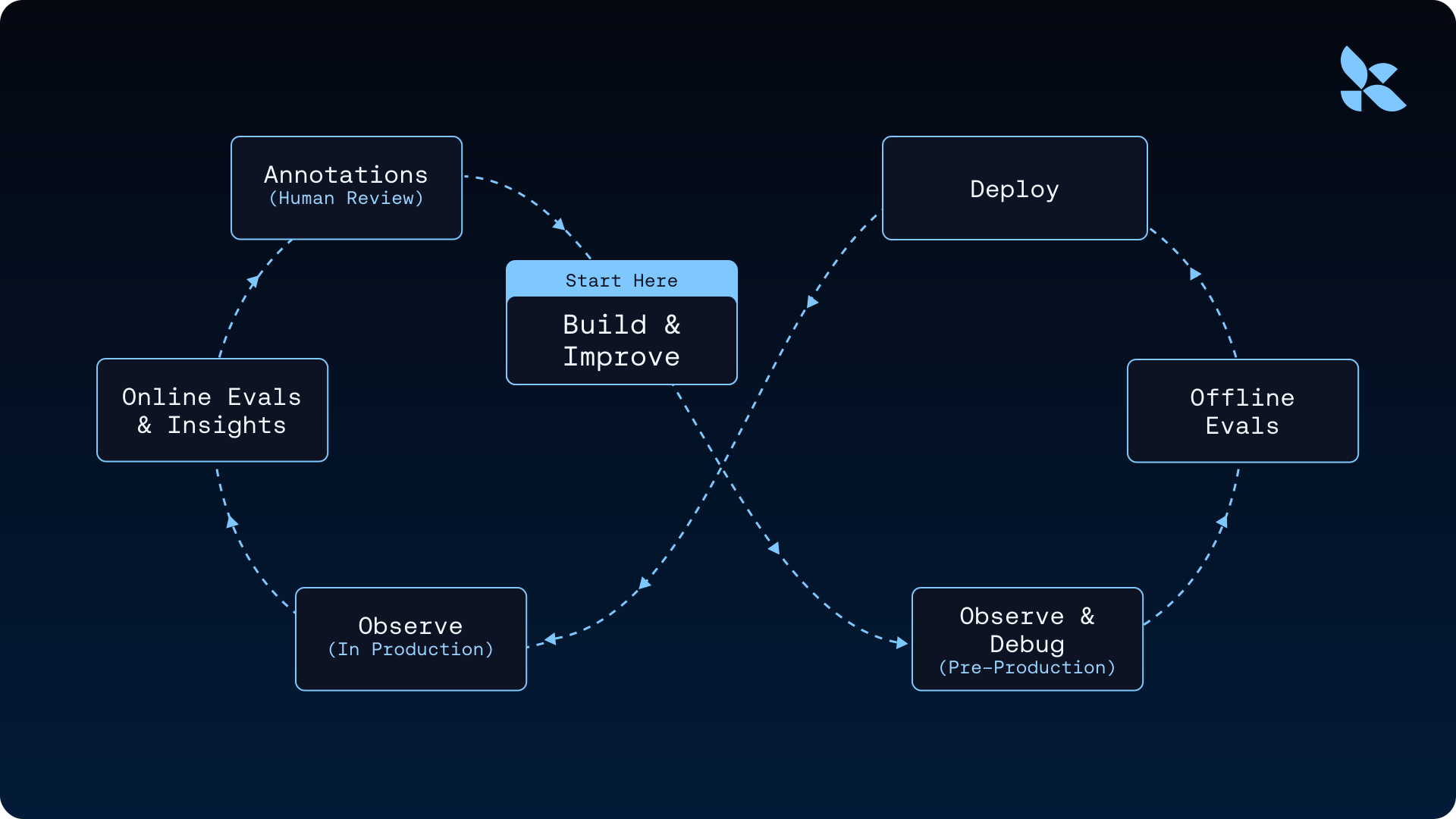
The most effective teams build a continuous improvement cycle that connects observability to action. Production traces flow into the Insights Agent, which analyzes usage patterns and surfaces key insights about agent behavior. These insights guide the creation of evaluation datasets that test real-world scenarios. Evaluations then drive targeted improvements to prompts, tools, and reasoning strategies. Each improvement generates new production traces, completing the cycle. Regression testing locks in these gains by ensuring that once you fix a bug, it stays fixed.
You can configure rules that automatically add traces matching specific criteria to datasets, route problematic cases to Annotation Queues for review by domain experts, or trigger online evaluations when quality thresholds are breached
Real-world application
Harmonic demonstrates this flywheel in practice. They track every model invocation with direct integration into a playground environment, linking execution traces to specific models and inputs. This visibility allows their team to analyze performance patterns and make data-driven adjustments. When they identify a problematic trace, they can add it to their evaluation dataset with a single click, immediately converting production failures into permanent regression tests that prevent the same issue from recurring.
This approach transforms debugging from reactive firefighting into systematic quality improvement. Teams capture failures automatically, understand root causes through trace analysis, and ensure each issue becomes part of their ongoing quality assurance process.
AI-assisted debugging with natural language queries
As trace volume grows, the bottleneck shifts from generating data to extracting insights fast enough to act on them. Polly, LangSmith's embedded AI assistant, lets you ask "Why did the agent enter this loop?" or "Did the model hallucinate in step 3?" and get answers in seconds by analyzing traces on your behalf.
For example, when a customer support agent starts giving incorrect policy information, you ask Polly "What caused the policy citation to be incorrect?" Polly traces through the execution tree, identifies that the retrieval step returned an outdated document version, and surfaces the specific step where the failure originated.
Traditional observability tools are often too reactive, requiring too much manual log inspection. Proactive detection and automated root-cause identification turn trace data into actionable insights without manual investigation.
Getting started with LangSmith tracing
LangSmith works with any orchestration stack. Whether you're using LangChain, LangGraph, Deep Agents, another framework, or custom code–setup is simple. For applications built with LangChain or LangGraph, enable tracing by setting just a few environment variables:
export LANGSMITH_TRACING=true
export LANGSMITH_API_KEY="<your-langsmith-api-key>"
export CLAUDE_API_KEY="<your-claude-api-key>"
export LANGSMITH_WORKSPACE_ID="<your-workspace-id>"
This configuration change starts sending traces to LangSmith without any code modifications. The SDK automatically instruments LLM calls, tool invocations, and chain executions at runtime, creating the hierarchical trace structure that enables deep debugging.
Adding tracing to any application
For applications, the traceable decorator instruments your functions automatically:
from langsmith import traceable

@traceable
def run_agent(user_input: str) -> str:
    # Your agent logic here — LangSmith traces this function
    # and every nested call automatically
    response = call_llm(user_input)
    return response
Add @traceable to any function you want to instrument. LangSmith logs inputs, outputs, and latency for that function and its children without requiring changes to your underlying logic. Traces flow asynchronously to LangSmith and don't add latency to your application.
Operational considerations
Tracing happens asynchronously, so it won't slow down your agent's responses. You can safely enable it in production without worrying about performance impact, even at high-volume workloads.
If you want to consolidate your observability tools, LangSmith integrates with OpenTelemetry. This lets you send agent traces to your existing OTel collector along with traces from your other backend services.
We recommend starting small: enable tracing on a subset of production traffic or in staging first. The traceable decorator doesn't require any architecture changes, so you can turn tracing on and off without needing to redeploy your application.
Turn traces into fixes faster with LangSmith
Three principles separate teams that ship reliable AI agents at scale from those that struggle. First, instrument everything before you optimize anything. Second, close the loop from production trace to regression dataset. Third, let automated evaluations replace instinct-based release decisions.
Start simple. Configure LangSmith tracing and run a few production requests. Once you can see step-by-step execution, identify one recurring failure pattern and add it to a dataset. That single action starts the flywheel turning.
The gap between prototype and production-ready AI agents is measured in observability. Teams that close this gap fastest treat every production trace as an opportunity to improve. Get started with LangSmith.