
Key Takeaways
- Most agent tools only see the backend. Browsers, apps, and devices contain valuable state and capabilities that traditional server-side tools cannot directly access.
- Headless tools bring client-side capabilities into the agent loop. Agents can invoke browser APIs, local memory, and application-specific actions as first-class tools while preserving structured inputs and outputs.
- Keeping execution on the client improves both UX and privacy. Agents can interact with the user's environment directly, reducing round trips and allowing sensitive data to remain local by default.
TL;DR: Most agent tools run on the server, which means agents can call APIs but not interact with the browser, app state, or device capabilities where users actually work. With headless tools in LangChain we close this gap by letting agents invoke client-side capabilities like geolocation, clipboard access, local memory, and in-app actions as first-class tools. That makes agents more useful, more private, and better aligned with real application behavior.
Today's agents are increasingly capable, but many of the capabilities users care about live in the client runtime rather than on the server. Browsers and applications own things like local state, user selections, device APIs, and application-specific actions that are often unavailable through backend systems. As a result, agents can reason about what should happen next but still struggle to act on the environment where the user is actually working.
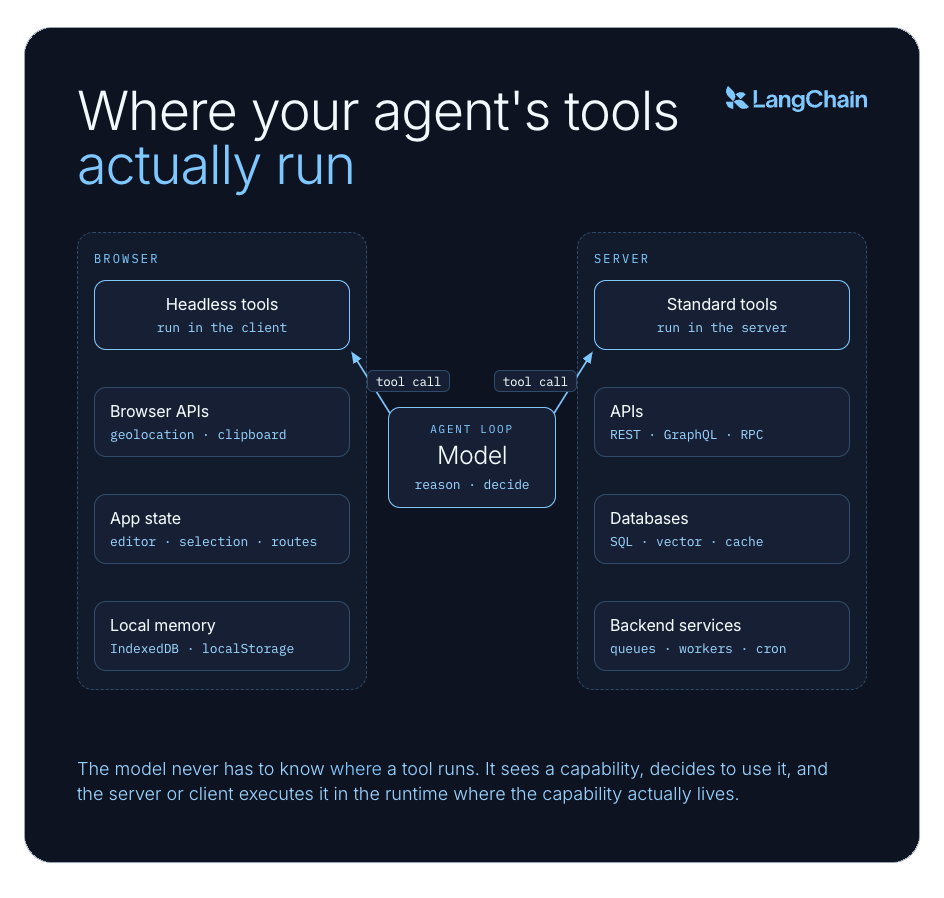
One reason for this gap is that most agent tools execute on the server. When a model decides to use a tool, the agent runs it in-process or delegates it to an external service such as an MCP server, then feeds the result back into the reasoning loop. This works well for APIs, databases, and backend systems, but it has clear limitations:
- It cannot directly access browser-only or device-only APIs.
- It cannot act on frontend state that has never been synchronized to the server.
- It often forces privacy-sensitive data to leave the device.
- It introduces unnecessary round trips for actions that are inherently local.
The browser is where many high-value agent actions actually happen: reading local application state, acting on the current UI, and using device capabilities without shipping that data to a backend first. Desktop apps expose the same pattern through local files, native integrations, and session-specific state. If your agent cannot reach that runtime, it stays good at backend workflows but weak at the interactions users actually experience.
Imagine you are building a sidecar agent for Figma, Google Slides, or a rich-text editor. The agent can reason about the user's request on the server, but the document model, selection state, and editing commands all live in the client. A server-side tool cannot insert text at the cursor, reformat the selected object, or jump to the active slide, because those actions belong to the application runtime, not the backend API. Today, teams usually bridge this with an ad-hoc UI bridge: serialize some client state to the server, get a response back, then imperatively patch the client. It works, but it is fragile, hard to compose, and invisible to the model's reasoning loop.
That is the problem headless tools solve in LangChain.
What headless tools change
A headless tool looks like any other tool to the model: it has a name, a description, and a set of expected inputs. The model decides when to call it, just like any other tool. The difference is what happens next.
Instead of the server running the tool itself, it sends the tool call to the client: the user's browser, desktop app, or whatever environment actually has the capability. The client runs the tool locally and sends the result back, and the agent picks up where it left off.
While this sounds like a small implementation detail at first, it actually changes what kinds of systems an agent can reliably control.
The model never needs to know where the tool runs. It sees a tool, decides to use it, and gets a result. But behind the scenes, the server and the client are coordinating: the server knows what the agent wants to do, and the client knows how to do it. That separation is the core idea.
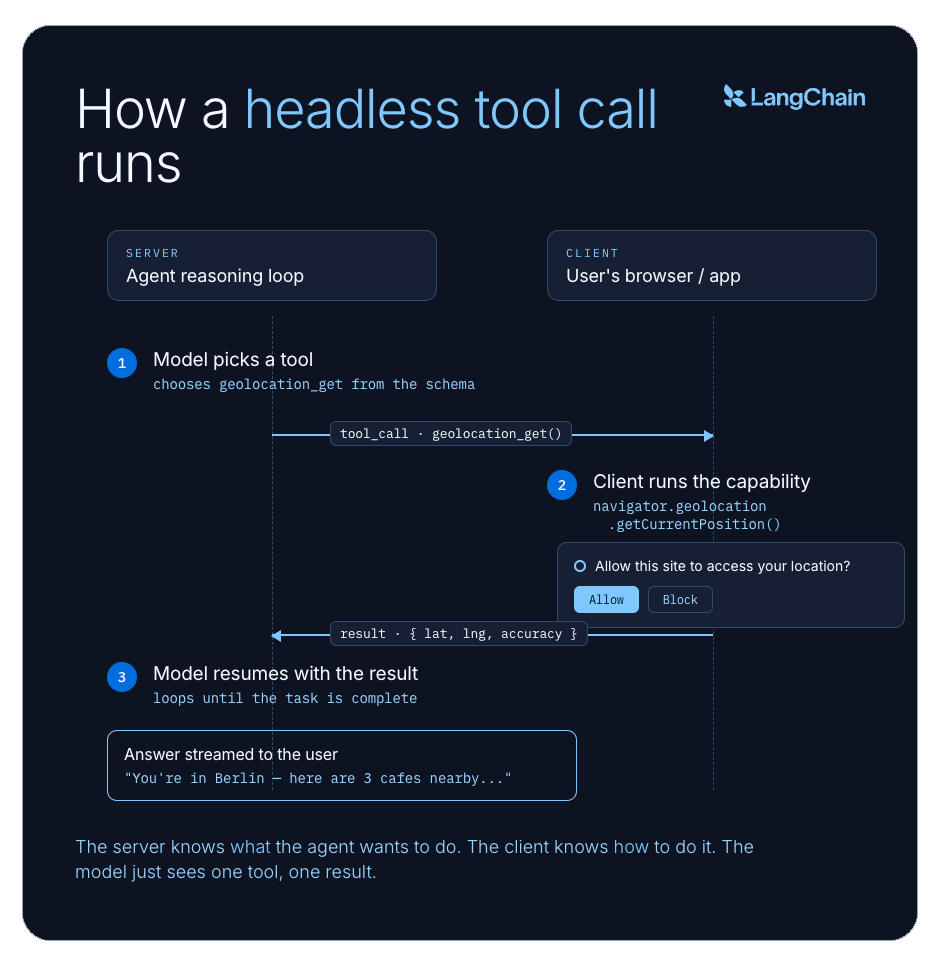
You could wire this up manually, call navigator.geolocation.getCurrentPosition() from your React app and send the result to the agent. But then the model has no way to discover or decide when to invoke that capability. It lives outside the reasoning loop as an ad-hoc side channel. Headless tools put client-side actions inside the agent's reasoning loop, not alongside it.
Why this matters
The benefit is not just "browser access." Imagine an agent helping you work through a slide deck: it should be able to jump to the active slide, read local context, and update the presentation in place without shipping the whole session to a backend. Headless tools make that kind of interaction possible by exposing client-side capabilities as real tools inside the agent loop.
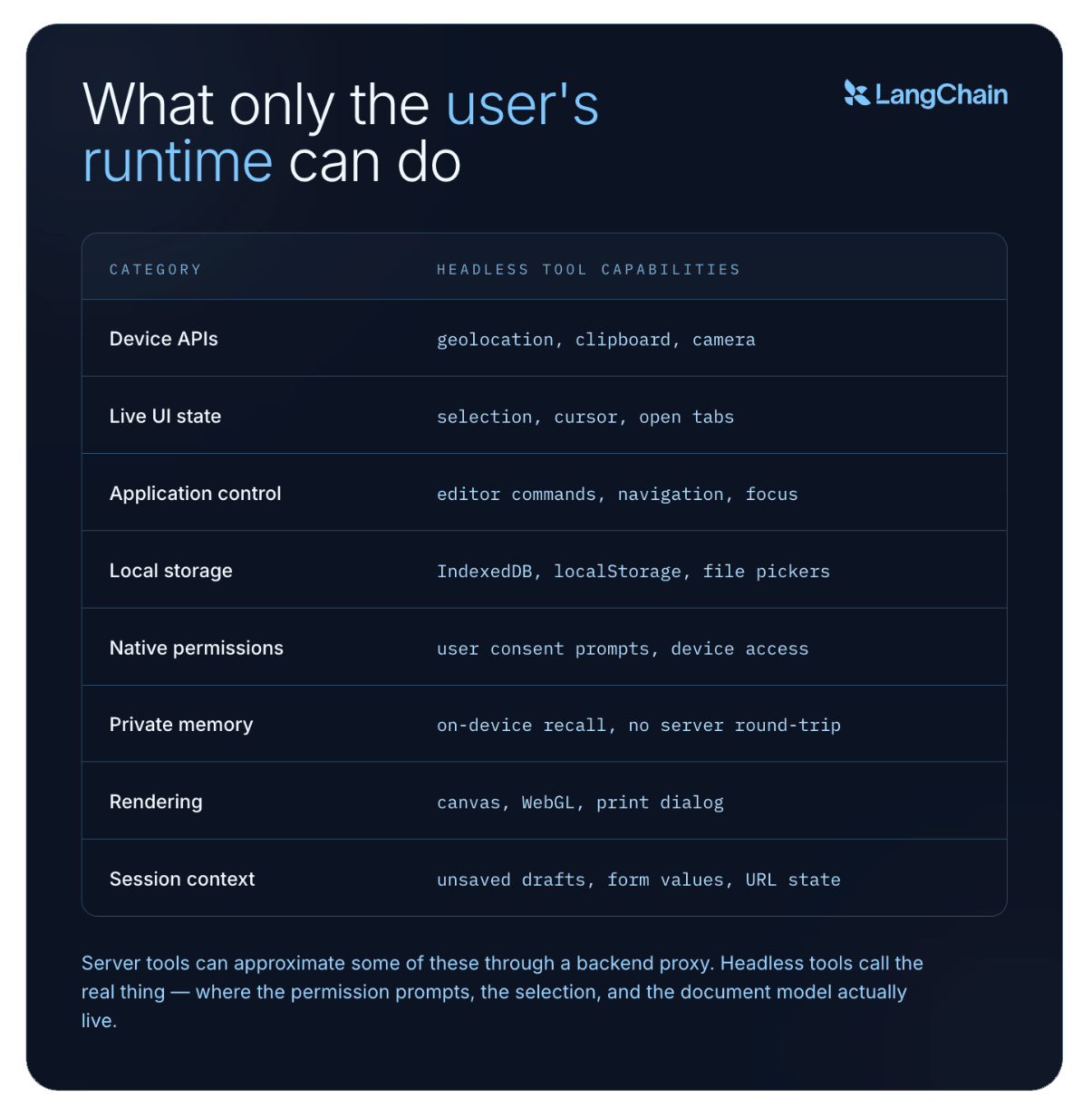
Some operations are impossible to emulate correctly on the backend. Geolocation is the obvious example — the browser owns permission prompts and device signals. Clipboard access, canvas rendering, file pickers, and live UI navigation all depend on the active client environment. A standard tool can approximate these through a backend service. A headless tool can call the real thing.
But headless tools are not just for browser APIs. They are a general mechanism for giving agents safe access to application-native actions. For example: slidev-agent , a plugin for the popular Slidev presentation framework, uses a headless tool to navigate to a specific slide in the user's active presentation. This is not a data retrieval problem or a server automation problem.
This pattern also changes privacy tradeoffs. Agent memory does not always belong in a centralized backend. With a headless tool backed by a browser storage like IndexedDB, memory can stay local by default — durable, low-latency, and naturally scoped to that user and browser — without turning recall into a server-side data management problem.
How it works in code
In TypeScript, the separation between definition and implementation is especially clean. You define the tool once, attach the implementation with .implement(...), and pass the implementation into the frontend streaming hook. The server and client share the same schema, but only the client loads the browser-specific execution logic.
// tools.ts
import { tool } from "langchain";

export const geolocationGet = tool({
  name: "geolocation_get",
  description: "Get the user's current location from the browser.",
  schema: z.object({}),
});
// App.tsx
import { useStream } from '@langchain/react';
// shared tools definition
import { geolocationGet as geolocationGetDefinition } from './tools';
export function App() {
const stream = useStream({
// ...
tools: [
// actual tool implementation on the client side
geolocationGetDefinition.implement(async () => {
const position = await new Promise<GeolocationPosition>((resolve, reject) =>
navigator.geolocation.getCurrentPosition(resolve, reject),
);
return {
latitude: position.coords.latitude,
longitude: position.coords.longitude,
accuracy: position.coords.accuracy,
};
}),
],
});
return <div> ... </div>;
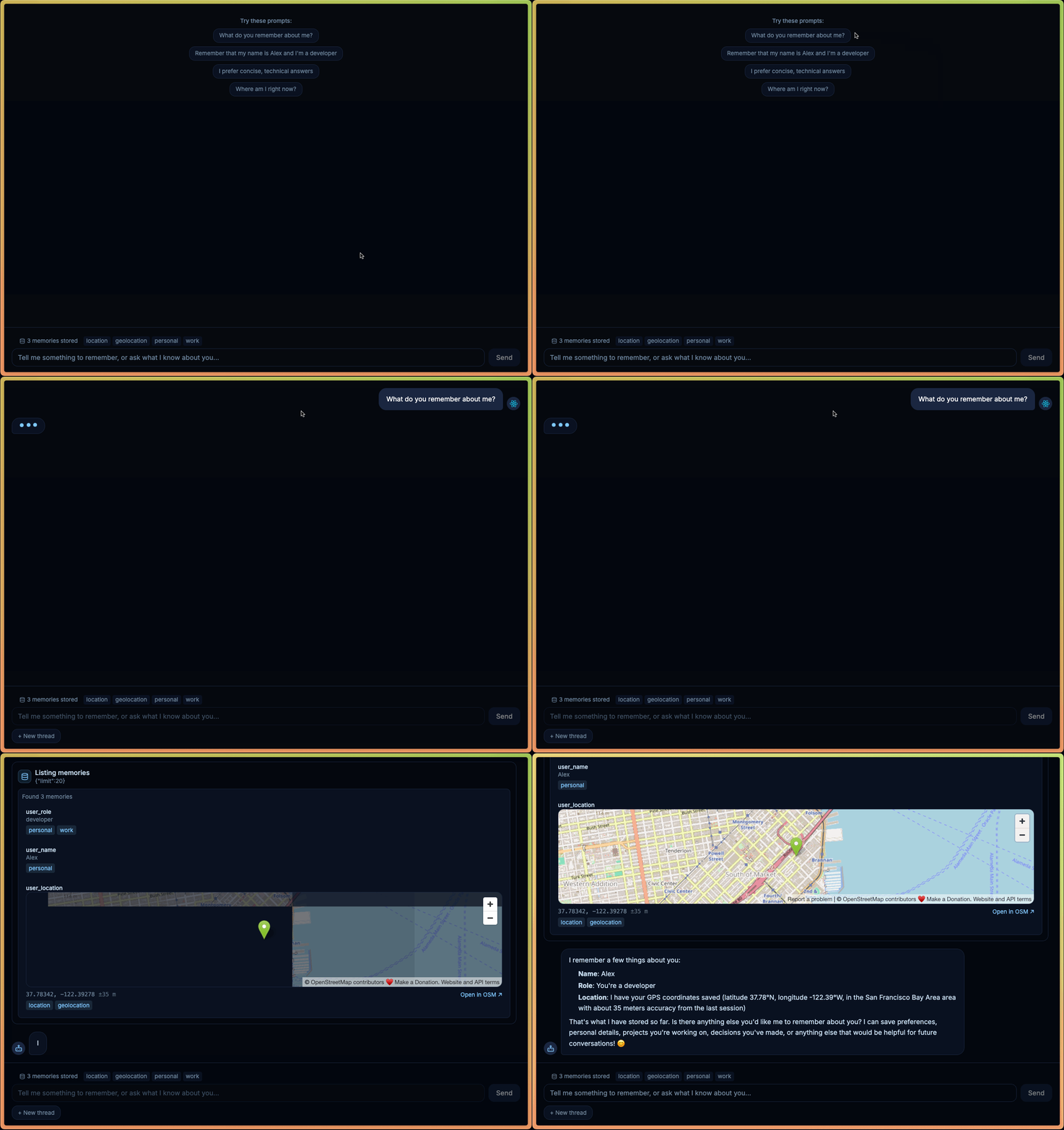
}Check out a live demo in our LangChain docs, combining browser-local memory with geolocation and optional human approval.
Summary
Standard tools gave agents access to backend systems. Headless tools give them access to where users actually work.
Users do not live on your backend. They live in browsers, apps, and devices, where many of the most valuable agent interactions happen. Headless tools make those interactions available while preserving typed schemas, explicit capabilities, structured outputs, and reviewability, allowing agents to use tools that are native to the user, not just convenient for the server.
Get started with headless tools in LangChain Python or LangChain JS.
Thanks to @huntlovell, @colifran_, and @sydneyrunkle for their thoughtful review and feedback.