

Key Takeaways
You can now run a coding agent on your most sensitive code and keep your source, your model, and your audit trail your own.
- One command sets up Deep Agents Code (
dcode) as a governed blueprint on NVIDIA NemoClaw, running the open Nemotron 3 Ultra model - An open model and an open harness put you in control: tune, audit, or swap either as your needs change
- Deny-by-default networking, human approval, and a full audit trail give you the controls a regulated team looks for
Why we built this
Turning a coding agent loose on a production codebase means giving it the ability to read and write files, run shell commands, install packages, and reach the network. That autonomy makes coding agents useful, but can also put sensitive systems at risk of unintended actions. The same agent that can fix your build can, in the wrong setup, touch files it shouldn't, run commands you didn't intend, send proprietary source somewhere it shouldn't go, or act with no record of what it did.
Two other pressures point the same way. Open models now compete with closed ones on cost and performance, and teams want that control instead of being locked into one vendor's model and roadmap. And plenty of enterprises need their code and data to stay inside a boundary they set, not wherever a hosted API happens to run.
So teams want the capability without the risk, the lock-in, or the data exposure. Running Deep Agents Code as a NemoClaw blueprint gives them three things.
Open. Nemotron 3 Ultra and Deep Agents Code are both open, so you set the cost and the roadmap instead of a vendor setting them for you. Audit them, tune them to your workload, run them on your own infrastructure, or swap either out as your needs change.
Secure and governed. Every action runs inside an OpenShell sandbox with deny-by-default networking, human approval on sensitive operations, and a full audit trail. These are the controls a regulated team will want to see before putting an agent anywhere near production code.
Yours to run. Because it runs on infrastructure you choose, your source code and your data residency stay under your control.
The pieces
- Deep Agents Code (
dcode): LangChain's open-source coding agent harness - Nemotron 3 Ultra: NVIDIA's open model
- NemoClaw: NVIDIA's open blueprint that onboards and manages the agent
- OpenShell: NVIDIA's secure runtime and sandbox that NemoClaw runs the agent in
How it works
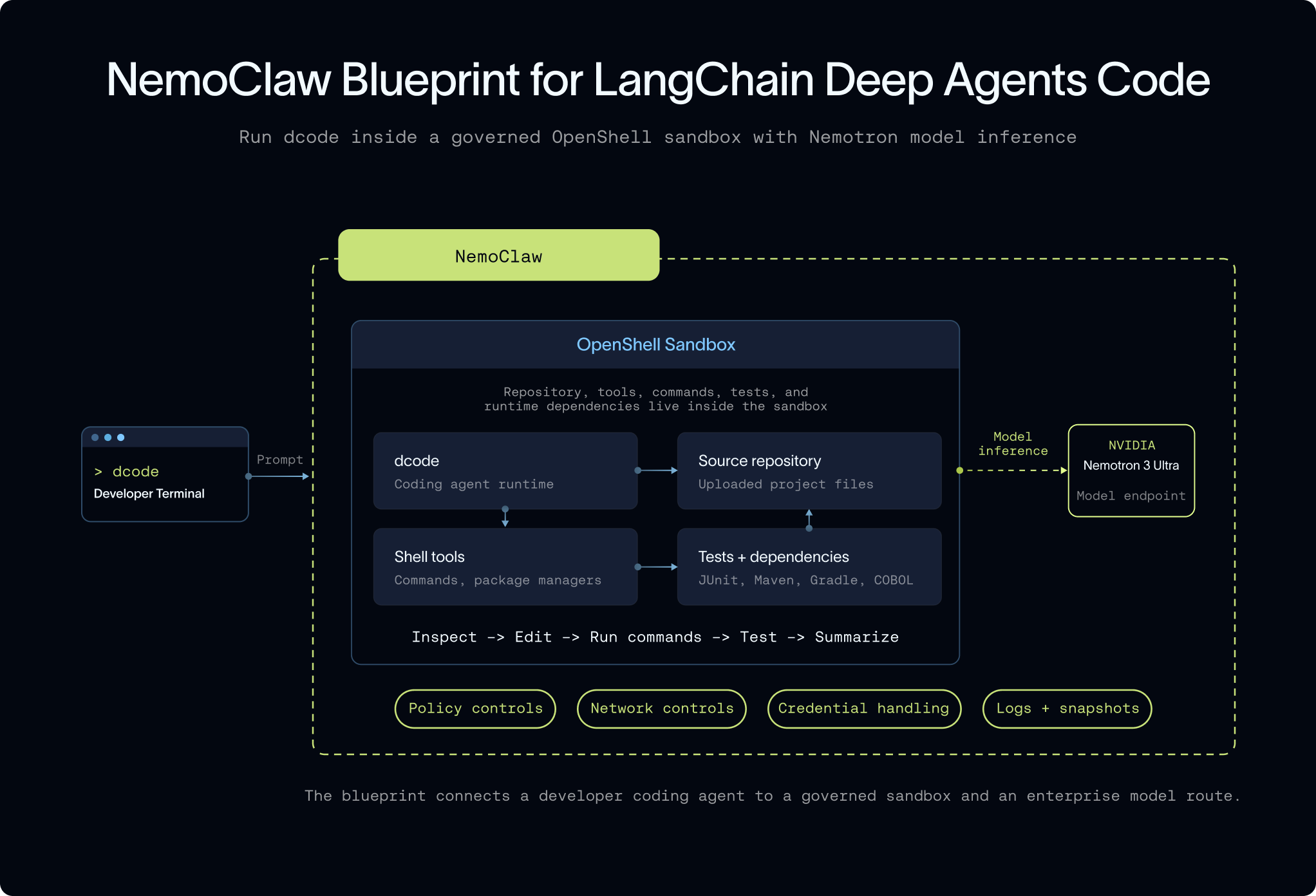
nemo-deepagents onboardOne command builds an OpenShell sandbox, installs dcode, and wires it to Nemotron 3 Ultra through NemoClaw's managed inference.
From there, it feels like any coding-agent session: you give it a task, it inspects the repo, writes a plan, edits across files, runs the tests, and shows you a diff to review. The difference is where the work happens. The agent runs inside the sandbox, and network egress is denied by default and approved per request. Credentials stay with NemoClaw, outside the sandbox, so the agent itself never touches them. Every run can be snapshotted into NemoClaw's own per-session audit logs. Nothing leaves the box unless you allow it.
The code that was too risky to touch
Legacy modernization is the clearest use case: the stakes and the payoff are both high. Decades of business logic sit in COBOL that few people still read, on systems too critical to touch carelessly, maintained by engineers who are retiring. Get it wrong and you put the system of record for the business at risk. Get it right and you eliminate risk that has been sitting on the books for decades.
Modernizing an entire application estate, hundreds of interdependent programs, starts with mapping what they actually do before anyone rewrites them. That's the hardest part, and it's closer to a discovery problem than a coding one. The next section walks through how to approach it at scale. Once you're pointed at something bounded (a documented program, a single module, one wave of a larger plan), dcode can work the way an experienced engineer would: the source never leaves the sandbox, and every step is auditable. That control matters as much as the code quality once you're touching production logic.
The same pattern extends across the rest of the modernization backlog:
- .NET and Windows modernization: move legacy .NET applications and SQL workloads off costly licenses and toward Linux
- Cloud and infrastructure migration: re-platform older virtualized or on-prem applications toward cloud-native targets, with dependency mapping and a plan you can check
- Dependency and framework upgrades: bump end-of-life frameworks and packages, resolve the breakages, and hand back a migration summary
- Test repair and coverage: diagnose a broken or thin test suite, patch the code, rerun, and raise coverage on the modules it touched
- Security and patch workflows: patch vulnerable dependencies or unsafe patterns and produce an audit-friendly record of the change
- A governed internal coding assistant: preload your repo conventions, skills, and approved tools so any engineer can hand off routine codebase work
This is the work we built the blueprint for. Running the process through NemoClaw is what makes it safe to try on code this sensitive in the first place.
How to leverage the blueprint for a modernization project
A real modernization effort is best managed through a sequence of reviewable steps. Here is how a team would run one with the blueprint:
- Stand up a governed sandbox. Onboard
dcodethrough NemoClaw and bring the target codebase into the sandbox, where nothing in the repo leaves that boundary. - Assess and document first. Ask
dcodeto read the code and capture what it actually does: the business logic, entry points, data flows, and dependencies within the scope you give it. On legacy systems this is the hardest part: for a handful of programs,dcodecan do this directly; for a full estate, start with your own dependency mapping and feed it the result. Either way, this is the foundation for everything after. - Decompose and plan in waves. Have it group the code into domains and propose a migration order, so you modernize in small, reviewable waves instead of one risky rewrite.
- Refactor incrementally. Take one wave at a time: translate the code toward the target stack (for example, COBOL toward Java), preserve behavior, and run the tests after each change.
- Review and approve. Every diff is yours to review, and any sensitive action or network request is gated for human approval. Snapshot each wave so you keep an audit trail.
- Repeat and verify. Move wave by wave until the system is modernized, with passing tests and a documented record of what changed and why.
Because each step runs in the sandbox under your defined policies, you get the speed of an agent while keeping the approvals, boundaries, and audit trail a regulated migration demands.
Get started
Start with the NemoClaw install:
curl -fsSL https://www.nvidia.com/nemoclaw.sh | bashThe installer sets up the NemoClaw CLI and launches onboarding. In the wizard, choose:
- Agent: LangChain Deep Agents Code
- Inference provider: NVIDIA Endpoints, or another OpenAI-compatible endpoint
- Model: Nemotron 3 Ultra
- Sandbox name:
<sandbox-name> - Resource profile: OpenShell defaults / no profile
- Policy tier: Balanced
If NemoClaw is already installed, you can start onboarding directly:
nemo-deepagents onboardIf your project needs extra runtime tooling, such as Java, COBOL, Maven, Gradle, or other system packages, build the sandbox from a custom Dockerfile during onboarding instead, so the sandbox matches your application stack while dcode still runs inside the NemoClaw/OpenShell governed runtime:
nemo-deepagents onboard --from path/to/DockerfileOnce onboarding completes, bring your code into the sandbox. For a local repository, upload it from the host:
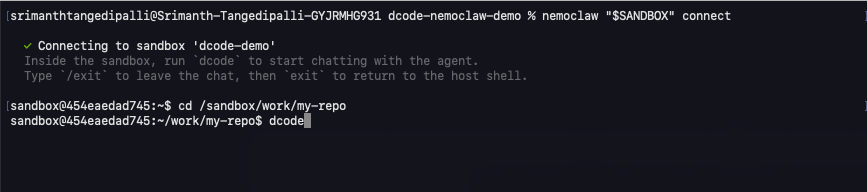
nemoclaw <sandbox-name> upload ./my-repo /sandbox/work/my-repoThen connect to the sandbox:
nemoclaw <sandbox-name> connectFrom there, cd into your folder, run dcode for an interactive session, and start handing it tasks.

The Deep Agents Code docs and the NemoClaw quickstart for Deep Agents Code cover the rest.
Bottom line
Enterprises have wanted to run coding agents on their most sensitive code for a while now. What has been missing is a way to do it without losing control of it. That's what running Deep Agents Code as a NemoClaw blueprint gives you: an open model and an open harness, in a sandbox you govern, set up with one command. Point it at the modernization work that was too risky to hand an agent before, and keep your source, your model choice, and your audit trail your own.
The learn more, visit the NemoClaw for LangChain Deep Agents blueprint.
