
Key Takeaways
- Context shapes agent behavior. Alongside the model and code, context - instructions, skills, and policies - has an outsized impact on how agents perform. Many failures trace back to context that's missing or stale.
- Context needs a different home than code. It's often written by non-engineers and changes fast, so GitHub isn't always the right fit. It needs tooling built around collaboration and speed.
- Context Hub centralizes it all. LangSmith's new feature lets teams store, version, and collaborate on agent context files with tags to deploy the right context across environments.
Today we’re launching Context Hub in LangSmith, a place to store, version, and collaborate on the files that define how agents behave.
That includes AGENTS.md files, skills, policies, examples, and other file bundles your agents rely on. Context Hub gives these files a central home so teams can manage them the same way they manage other important parts of their agent system.
Why context matters
Agents are shaped by three main components: the model, the harness, and the context.
The model handles reasoning and generation.
The harness is the code around the model. It defines the agent loop, tools, state, permissions, and other runtime behavior. You can build your own harness or use a prebuilt one like Deep Agents.
The context is the information the agent reads and follows. This can include system instructions, AGENTS.md files, skills, examples, company policies, writing guidelines, support procedures, and domain-specific knowledge.
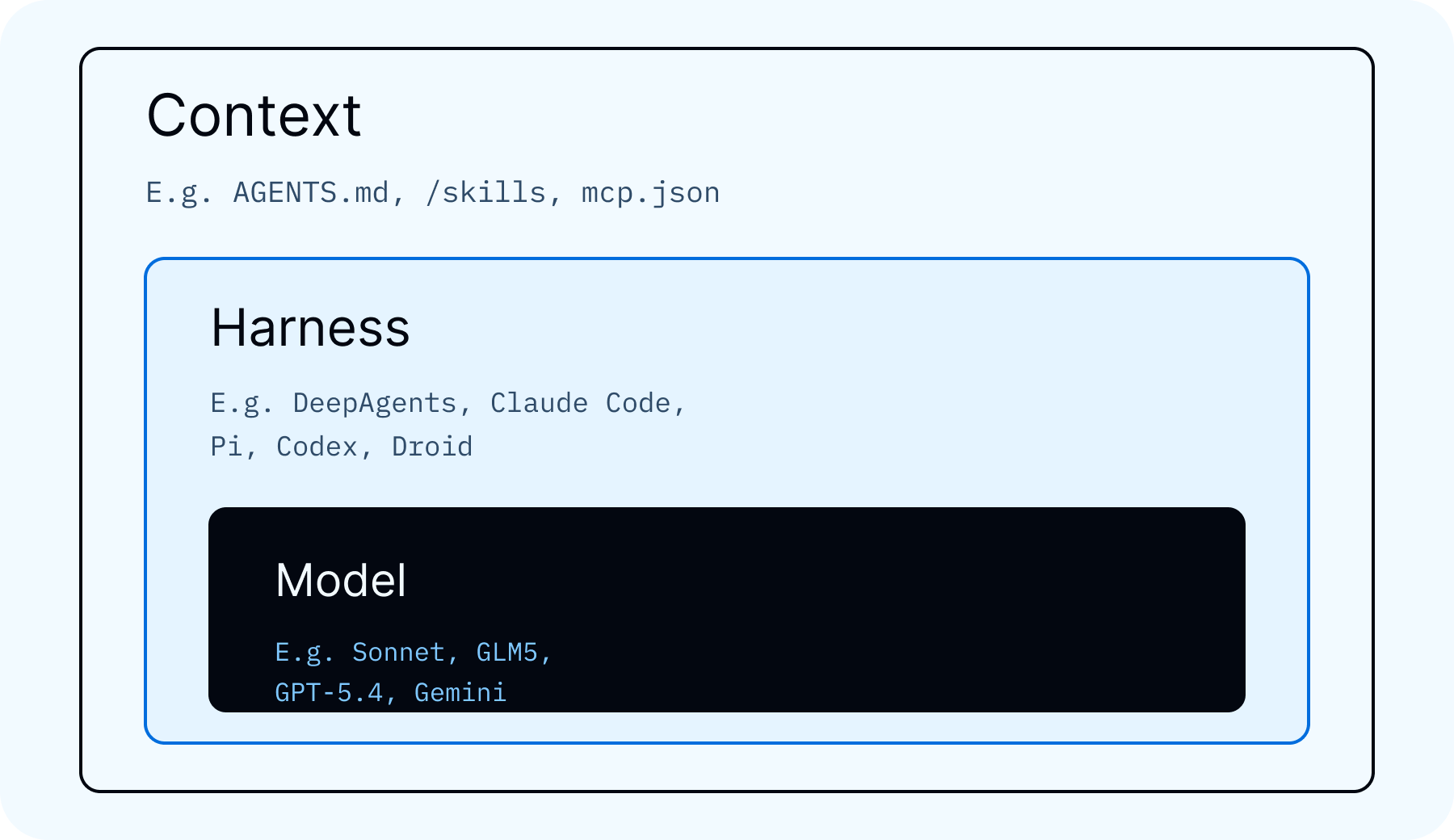
Context has a large impact on agent behavior. A better model or harness can help, but many agent failures come from missing, stale, or poorly managed context. The agent may have access to the right tools, but still need the right instructions, examples, and policies to use them well. Some have even argued context is more important to invest in than the harness itself.
Why context needs its own home
Harness code usually belongs in GitHub or wherever your engineering team manages code. Context often needs a different workflow.
First, context is often managed by people outside engineering. At LangChain, we use skills for brand design, blog writing, product messaging, and more. The people best suited to create and review those files are often designers, marketers, support leads, product managers, or other subject matter experts. GitHub can work for some teams, but it is not always the right interface for everyone who needs to shape agent behavior.
Second, context changes quickly. Teams update instructions, refine examples, add policies, and adjust skills as they learn what works. Agents can also create and update context themselves. For example, an agent might research a topic, produce a set of reference files, and save them for future agents to use.
What Context Hub provides
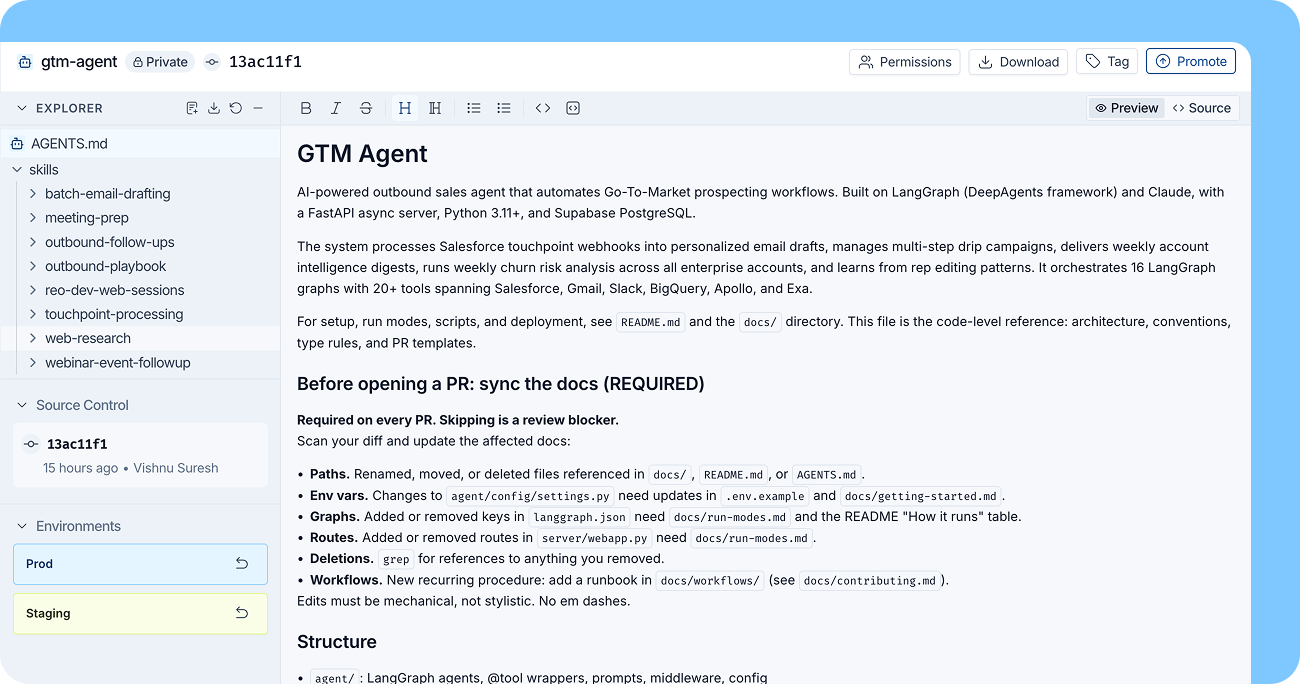
Context Hub gives teams a central place to manage agent context in LangSmith.
It supports AGENTS.md files and skills out of the box, and it is flexible enough to store other file bundles as well.
Some of the core features include:
- Versioning: Track changes to context files, inspect previous versions, and roll back when needed.
- Tags: Mark versions with tags like
dev,staging, orprodso agents can use the right context for the right environment. - Comments: Collaborate with teammates directly on context changes.
The goal is to make context easier to manage as a first-class part of your agent system.
Use LangSmith Context Hub
To use LangSmith Context Hub, first you need to upload skills or other files. You can do this in a few ways.
Manually define in UI: Manually create skills or other files from the LangSmith UI.
- Open Context Hub in LangSmith and create a new repo
- Pick the repo type (
skilloragent) and set a handle (for example,support-style-guide) - Create files directly in the UI editor, such as
SKILL.md,AGENTS.md, or policy/reference docs - Save your edits as a commit with a clear message
- Add a tag like
dev,staging, orprodso agents can pin to that version
Upload from local computer: Upload locally defined files with the LangSmith CLI.
# 0) Optional: verify your CLI has Hub commands
langsmith --help | grep hub

# 1) Authenticate
langsmith auth login

# 2) Scaffold a local skill folder
langsmith hub init --type skill --dir ./skills/support-style --name support-style

# 3) Edit files locally (for example SKILL.md)
$EDITOR ./skills/support-style/SKILL.md

# 4) Upload to Context Hub
# (creates the repo if it doesn't exist, then writes a new commit)
langsmith hub push support-style --type skill --dir ./skills/support-style --description "Support response style guide"

# 5) Upload future edits as new commits
langsmith hub push support-style --type skill --dir ./skills/support-style
Use --type agent if you're uploading an AGENTS.md-style repo instead of a skill repo.
Agent created: You can also have an agent create context. This was first proposed by Karpathy with his LLM wiki idea. For a full example, see the section below.
Once context exists, there are several ways to use LangSmith Context Hub.
Sync to disk: Use the LangSmith CLI to pull skills and other context to your local disk. This lets coding agents and other agent harnesses read from those files.
# 1) Pull latest version to local disk
langsmith hub pull support-style --dir ./context/support-style

# 2) Pull a pinned version for reproducible agent runs
# (use a commit hash or your team's ref/tag)
langsmith hub pull support-style:<COMMIT_OR_TAG> --dir ./context/support-style-pinned

# 3) (Optional) Inspect repo metadata to get the latest commit hash
langsmith hub get support-style
hub pull wipes and rewrites the destination directory, so use a dedicated folder (for example ./context/...).
Use it as a virtual filesystem in Deep Agents: Use Context Hub as a virtual filesystem in Deep Agents.
Example workflow (Deep Agents SDK):
backend = CompositeBackend(
    default=StateBackend(),  # thread-scoped
    routes={
        "/memories/": ContextHubBackend("my-agent"),  # durable memories in Context Hub
    },
)

agent = create_deep_agent(
    model="anthropic:claude-sonnet-4-6",
    backend=backend,
)
CompositeBackend routes filesystem paths by prefix. In this setup, /memories/* is persisted to LangSmith Context Hub via ContextHubBackend, while other paths remain thread-scoped in StateBackend. This gives you durable long-term memory without making the entire virtual filesystem persistent.
Example: building an LLM wiki
We built a workflow where an agent researches a topic and writes the result into a Context Hub entry.
The agent is given a research task. It gathers information, organizes what it finds, and creates a folder of files that future agents can reference. That folder can include summaries, source notes, terminology, examples, and instructions for how to use the research.
Once the folder is stored in Context Hub, teammates can review it, comment on it, tag a version, and make it available to other agents.
Code: deepagents/examples/llm-wiki
# Clone the repo
git clone https://github.com/langchain-ai/deepagents.git
cd deepagents

# Install the example environment
uv sync --project examples/llm-wiki

# Initialize a wiki and publish first Context Hub revision
uv run --project examples/llm-wiki \
  python examples/llm-wiki/runner.py \
  --mode init \
  --repo "ada-lovelace-wiki"

# Ingest source notes into canonical wiki pages
uv run --project examples/llm-wiki \
  python examples/llm-wiki/runner.py \
  --mode ingest \
  --repo "ada-lovelace-wiki" \
  --source ./notes/ada.md \
  --source ./notes/speeches/

# Ask grounded questions against the maintained wiki
uv run --project examples/llm-wiki \
  python examples/llm-wiki/runner.py \
  --mode query \
  --repo "ada-lovelace-wiki" \
  --question "What did Ada contribute to computing?"

# Run a wiki maintenance pass and publish an updated Context Hub revision
uv run --project examples/llm-wiki \
  python examples/llm-wiki/runner.py \
  --mode lint \
  --repo "ada-lovelace-wiki"
What this produces over time:
/raw/*keeps ingested evidence/wiki/*becomes the canonical knowledge base/wiki/index.mdstays up to date for navigationlog.mdtracks ingest/query/lint updates chronologically- Every run syncs to Context Hub, so teammates can review, comment, and promote versions
This pattern is useful when agents need durable knowledge that improves over time, instead of starting from scratch on every run.
Continual learning with Context Hub
Agents in production will hit edge cases, make mistakes, and encounter situations their initial context didn't anticipate. Continual learning is how you close that gap — improving behavior based on real usage over time. In practice, most of that work happens in the context layer: AGENTS.md, skills, policies, examples, and memory files. Context Hub makes this practical by keeping everything versioned, reviewable, and immediately available to future runs.
Why this works
- Most agent quality problems are instruction, memory, or policy problems
- Context files are faster to iterate on than model or harness changes
- Versioned context combined with issue tracking creates a repeatable improvement loop
For Deep Agents deployments, using Context Hub backed memories, you can connect an issues board directly to the same context repo, keeping issues and context updates linked in one place.
Code: langchain-samples/deepagents-with-langsmith
# Clone the repo
git clone https://github.com/langchain-samples/deepagents-with-langsmith.git
cd deepagents-with-langsmith

# Install dependencies
uv sync

# Deploy a memory-backed deep agent and wire up the issues board
uv run python agents/memory_backed_agent/deploy_memory_backed_agent.py \
  --agent-name my-agent
An open memory standard
Agent memory is starting to settle into a few common categories: episodic memory from past interactions, semantic memory retrieved through vector or hybrid search, and procedural memory in the form of instructions, skills, and policies. What’s still missing is a shared way to store, read, update, version, and move that memory across agents, frameworks, and data layers.
We’re working with Elastic, MongoDB, Pinecone, and Redis to develop an open standard for agent memory. AGENTS.md and Skills files have become a useful convention for procedural memory, but there’s no shared spec for versioning them, tagging them by environment, or making them portable between agents. Together with partners who already support production data and retrieval workloads, we’re defining the interfaces, metadata, versioning patterns, and retrieval semantics that memory systems need to share.
Here’s what our partners are saying:
Building agents that work in production comes down to retrieval: getting the right context to the right model at the right time. Elastic already powers vector, keyword, and hybrid search for teams running agents at scale, and the Context Hub brings those capabilities to even more developers. Our work with LangChain demonstrates the value of an open ecosystem approach to advancing AI innovation.
- Ken Exner, Chief Product Officer at Elastic
The next generation of agents never sleep, work at machine speed and need the right context from vast amounts of conversation logs, memory and enterprise data. The real challenge is getting the right context to the right agent at the right moment. Agent context demands a dynamic schema and precise retrieval that operates at line speed. MongoDB is built for exactly that. We’re excited to collaborate with LangChain to develop the ContextHub open standard and reference architecture to enable the future of AI agents.
- Pablo Stern-Plaza, Chief Product Officer, AI and Emerging Products, MongoDB
Memory and context are what turn intelligent models into knowledgeable agents. We’re glad to be working with LangChain to help shape the Context Hub as an open standard for the ecosystem. Pinecone gives teams the retrieval layer to make those agents accurate and reliable in production.
- Ash Ashutosh, CEO at Pinecone
Memory and context are the most important unsolved problems for teams building agents today. It’s exciting to see LangChain’s Context Hub come together, and we’re proud to help shape what that standard looks like alongside LangChain’s team. Redis helps teams build agents that are faster, more reliable, and more useful in production. The Context Hub will be another step forward in that mission.
- Rowan Trollope, CEO at Redis
Conclusion
Agents are comprised of a model, harness, and context. As teams build more agents, that context increasingly lives in files like AGENTS.md, skills, policies, examples, and generated research.
LangSmith Context Hub gives teams a central place to manage those files, collaborate on changes, version updates, and use approved context across agents.