
Key Takeaways
- It is possible to test code samples in docs because most teams don’t do this, resulting in outdated content
- It doesn’t have to be a lot of manual work
- Give the Deep Agents CLI a try to make this happen
Stale code samples are a universal documentation problem. Every team that ships tutorials, API guides, or integration examples eventually sees examples break as dependencies change and APIs evolve. The problem is not unique to us, but it is exacerbated by how quickly our product—and the AI and LLM space more broadly—moves. New models, updated SDKs, and shifting best practices mean that what worked last month may not work today.
Making code samples testable solves this. That means running them in CI, asserting they execute correctly, and failing the build when they break. But setting up code samples to be testable is not trivial and requires some upfront investment. This setup cost can feel so daunting that the project never happens.
Delegating that work to agents is the perfect solution.
The problem: incomplete inline code that can’t be tested
Inline code samples are convenient to write. You test the code, copy the relevant snippet, paste it into your markdown files (or other docs files) and you ship. The problem is they're static and when an API changes you might forget to update the code sample if it uses that API.
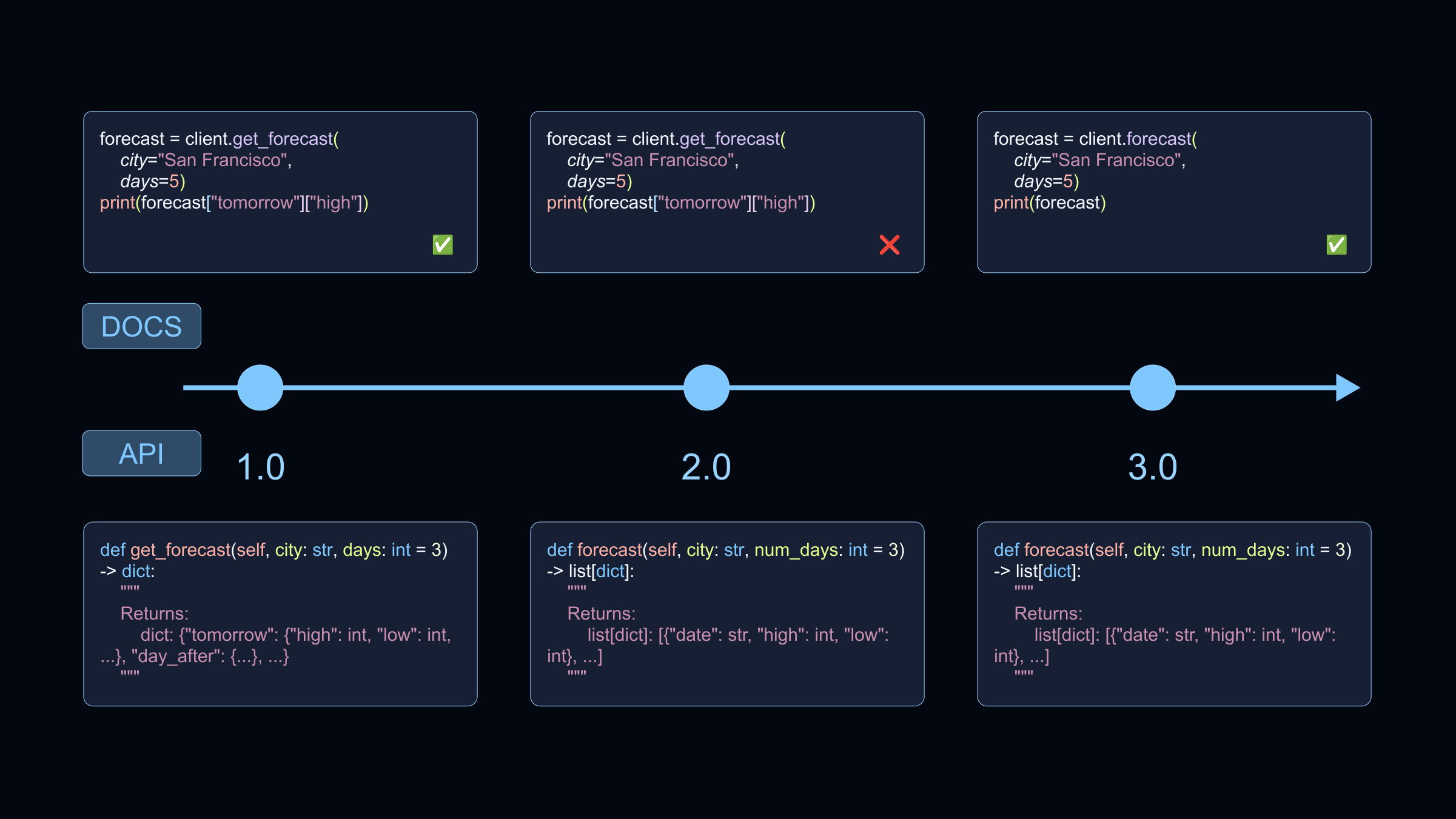
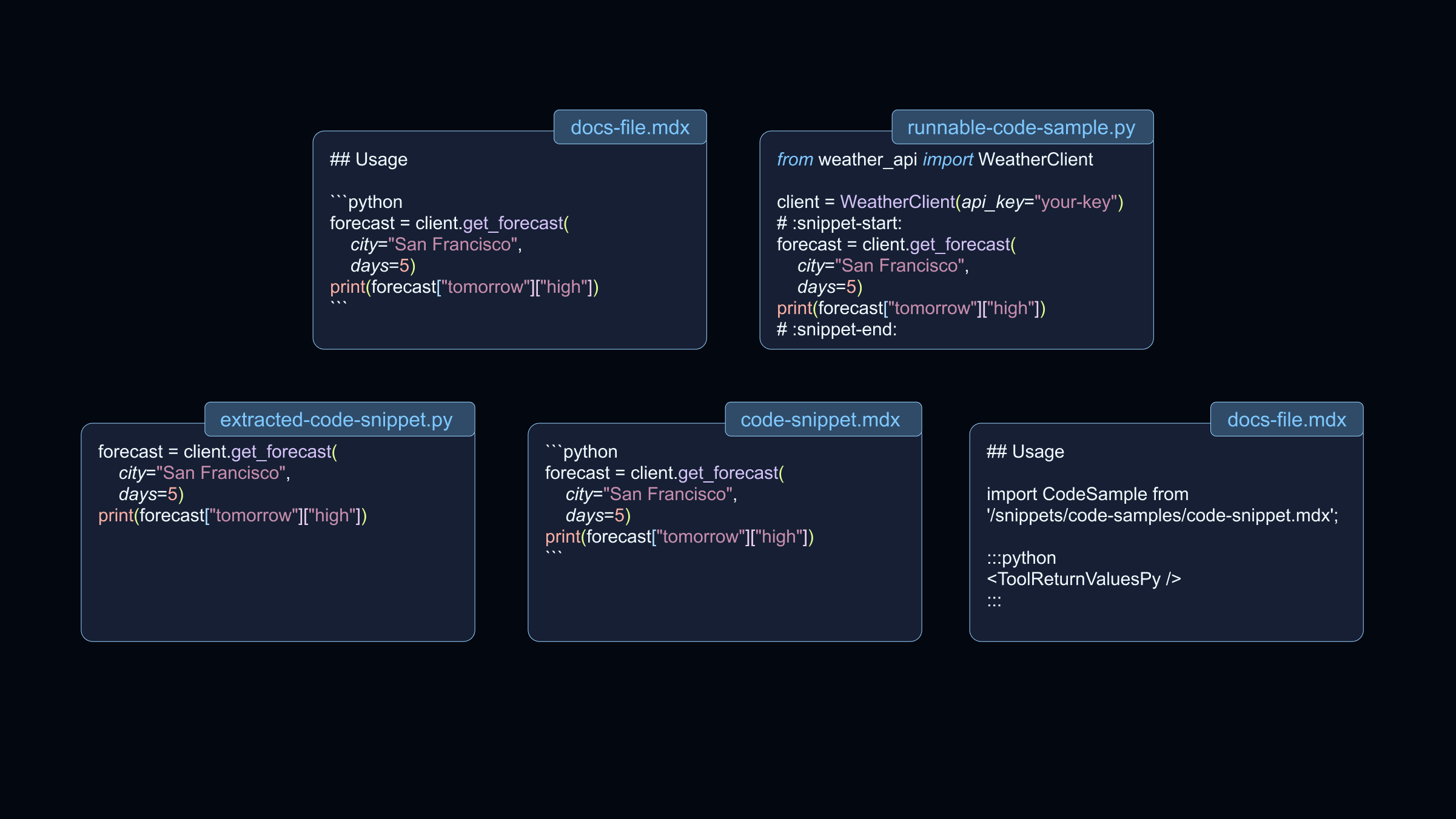
Ideally you want to know when code samples stop working. You want continuous integration tests. The same principle that applies to application code—automate checks, catch changes and regressions, fail the build when something breaks—applies to docs: treat code samples as code that must pass tests. To make code samples in docs testable the manual process looks like this:
- Extract inline code into standalone files.
- Add setup and teardown code.
- Add markup to designate what is the code snippet.
- Use tooling to extract the code snippet.
- Include the extracted code snippets as reusable snippets in the docs.
- Use CI to run the standalone code snippets regularly and when the samples change.
At LangChain, we used the Deep Agents CLI to offload the migration workflow. No coding required.
The Solution: Deep Agents + Skills: Write instructions once, delegate the rest
The Deep Agents CLI is a command line agent that you can chat with. One of its capabilities is using information from skills to perform tasks. Skills are reusable instructions that the agent loads when a task matches the skill description. These skills can be written just like step-by-step instructions to a coworker who might do these tasks. That’s exactly what we did. We wrote each step for the agent to perform:
- Move code into standalone files under
src/code-samples/{product}, organized by product area. - Add setup and teardown to make code snippets complete runnable examples.
- Lint the code using the configured linters.
- Add markup to define the code snippet using
:snippet-start:and:snippet-end:tags. If there is code that needs to be removed in the snippet it can be excluded with:remove-start:and:remove-end:. - Run the code samples to test them.
- Generate the snippets based on the markup and include the generated files in the docs.
This is the agentic part of the flow, on top of that we need a GitHub action that regularly runs the tests and creates tickets if a test fails.
This skill is in a hidden folder in our docs repo at .agents/skills/docs-code-samples/SKILL.md. With this set up, anyone can open the Deep Agents CLI from within the docs repo and ask the agent to make one or more code samples in the docs testable. When you ask a Deep Agent to "migrate the inline code in `streaming.mdx` to testable code samples," it uses this skill. The agent creates the right files, adds the right tags, runs the right commands, and includes the code snippets in the docs files.
SKILL.md
The docs-code-samples skill lives in .agents/skills/docs-code-samples/SKILL.md. Its frontmatter includes a `description` that tells the agent when to use it:
---
name: docs-code-samples
description: Use this skill when migrating inline code samples from LangChain docs (MDX files) into external, testable code files that are extracted with Bluehawk and used as Mintlify snippets. Applies when extracting code blocks from documentation, creating runnable code samples, using snippet delineators, or wiring Bluehawk output into MDX includes.
---
The body of the skill contains the full context for the agent:
- When to use the skill
- Directory structure and file layout
- Step-by-step migration instructions
- Commands to run and in what order
- Conventions (naming, tagging, imports)
You can view the full SKILL.md file in our GitHub repository.
Getting Started
This is only one example of how you can use skills with deep agents in your repository.
To get started with the Deep Agents CLI, check out the CLI docs.