

Key Takeaways
- Evaluator templates give you a running start. LangSmith now includes 30+ templates covering safety, response quality, trajectory, user behavior, and multimodal evaluation. Use them as-is or customize them — they work for both online monitoring and offline experiment runs.
- Build an evaluator once, apply it everywhere. A new Evaluators tab centralizes every evaluator in your workspace. You can attach an existing evaluator to a new tracing project in seconds, so your safety checks and quality metrics stay consistent across the org without maintaining duplicate copies.
- Good evals require coverage at multiple levels. A single evaluator checking the final answer won't catch whether your retrieval agent pulled the right documents or your planning agent delegated correctly. Effective agent evaluation means testing individual steps, full trajectories, multi-turn conversations, and specific tool calls within a trace.
Today, we're releasing two updates to LangSmith Evaluation: reusable evaluators and an evaluator template library.
Reusable evaluators give you a single place to view, manage, and apply evaluators across multiple tracing projects. Evaluator templates give teams a running start on testing and monitoring agents without building everything from scratch.
Where evaluations get stuck
Figuring out what "good" looks like is one of the hardest problems when building agents. Your agent might call the right tool but format the response poorly. It might handle single-turn interactions well but fall apart over a multi-turn conversation. And a single evaluator that checks the final answer won't tell you whether your retrieval agent pulled the right documents or whether your planning agent chose the right subagent to delegate to. You need evals at different levels: individual steps, full trajectories, entire conversations, and sometimes specific tool calls within a trace.
Building evaluators across those levels can take weeks. You write a prompt, check the scores against real data, tune it, and repeat. That iteration is important, but when you're starting from scratch every time, it's time spent on the basics instead of improving your agent. And once you've built a good evaluator, you’ll want to apply it across tracing projects without maintaining separate copies.
We've been building evaluation tooling in LangSmith for over a year, from openevals evaluator framework to Align Evals for evaluator calibration to multimodal evaluator support. Today's release adds two features we've heard the most demand for.
Evaluator templates
We've worked with a lot of teams running agents in production, and the same evaluation questions keep coming up: is the agent safe? Is the response actually good? Did it take the right steps to get there?
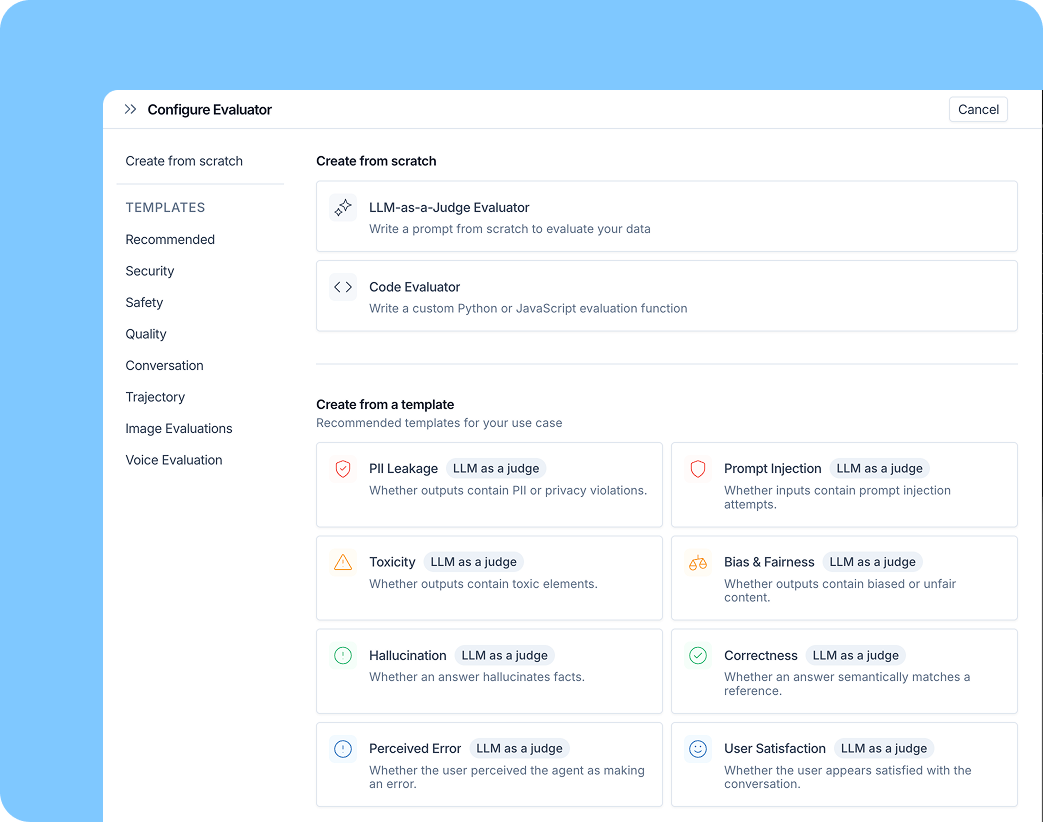
Templates cover the categories we see come up most often:
- Safety and security: prompt injection detection, PII checks, bias and toxicity
- Response quality: correctness, helpfulness, tone
- Trajectory: did the agent take the right steps?
- User behavior analysis: language distribution, satisfaction signals
- Multimodal: voice and image review
These are a few of the 30+ evaluator templates available. Templates include LLM-as-judge evaluators with tuned prompts and rule-based code evaluators. Use them as-is or customize for your agent.
They work for both online and offline evaluation. For online evaluation, templates help you categorize production traffic: detecting prompt injections, flagging unexpected user behavior, or surfacing traces that need human review. You can use your corrections to tune the evaluator prompt so it performs better next time
For offline evaluation, templates give you a starting point for running experiments across your datasets. Run the evaluator, check scores, filter down to failures, and understand what went wrong.
These templates are also available in openevals v0.2.0, released today, with new multimodal support for evaluating voice and image outputs. You can use them directly in code or through the LangSmith UI.
Reusable evaluators
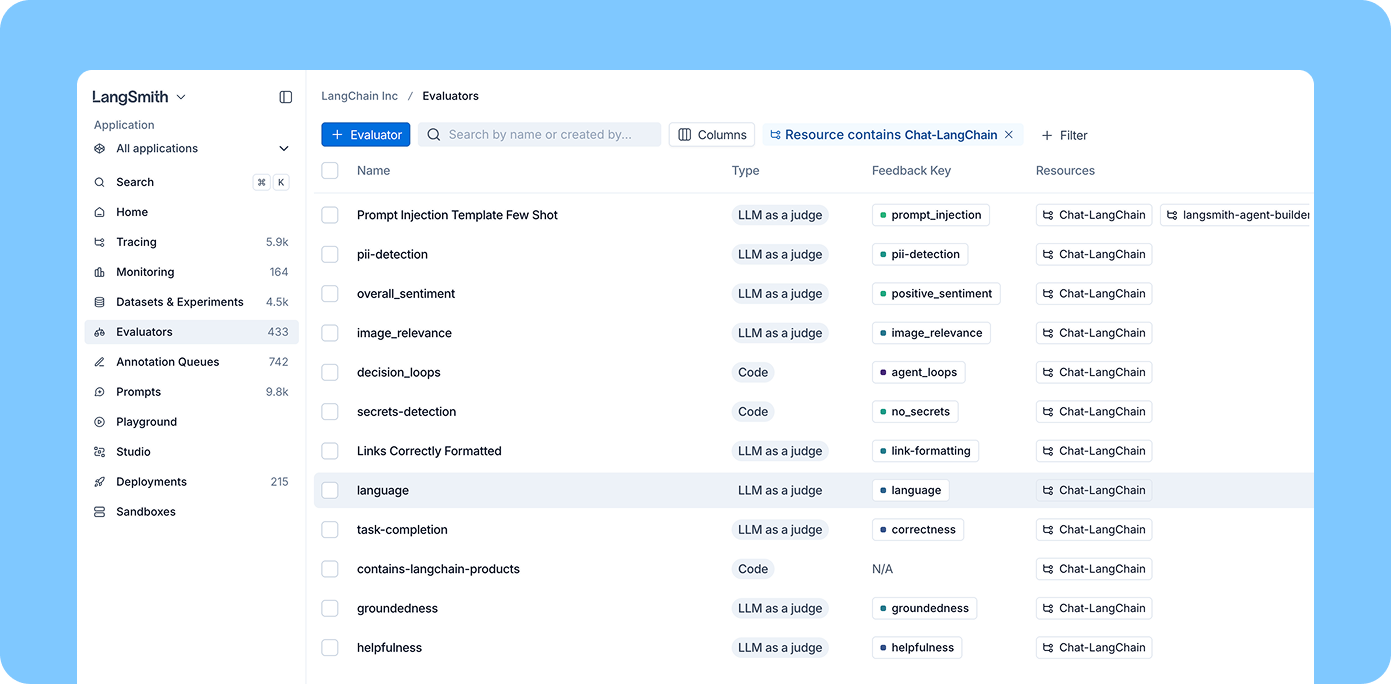
Once you've built evaluators that work well, you need a way to manage them centrally. A new Evaluators tab surfaces every evaluator in your workspace, regardless of which project it's attached to. You can filter by tracing project and attach an existing evaluator to a new project in seconds.
If your team owns evaluation quality across the org (defining safety checks, standardizing quality metrics), you can build evaluators once and apply them everywhere. No more maintaining separate copies of the same safety evaluator across every tracing project.
For individual engineers working in a specific tracing project, the experience stays simple: you can quickly add and configure evaluators scoped to your project from the tracing view.
As an example, say you build a prompt injection evaluator from a template. You tune the prompt, validate it against sample data, and it works well. With reusable evaluators, you attach it to every production tracing project from one place. When you improve the prompt, the update applies everywhere.
What's coming next
If you try out the new features, let us know how they're working for you. Next up, we're adding spend visibility so you can track what evaluations are costing you and set budgets accordingly.
Get started
Evaluator templates and reusable evaluators are available now in LangSmith.