

Key Takeaways
- One small entry point connects your agent to Harbor. A
langgraph.jsonregistry plus amake_graphfactory is the only glue you write, and that factory can stay model-agnostic by reading the model Harbor passes from the command line - Cloud sandboxes let you scale evals horizontally and run agents in isolation. Each trial gets a fresh LangSmith sandbox, so trials never share state, and you can run hundreds in parallel instead of churning through them serially on one machine
- Traces turn scores into explanations. With the
langsmithplugin, every job lands as a dataset and experiment with the verifier's reward as feedback, and agent traces attach directly so you can see why a trial passed or failed, not just whether it did
As agents increase in capabilities, evaluations have gotten more difficult. Agent harnesses like Claude Code, Pi, and Deep Agents now give agents access to entire computers to read files, execute scripts, run code, and more. Every agent now needs to run in its own clean, reproducible environment for a given task.
Evaluating long-running, stateful agents requires a new eval runner. Harbor has emerged as the industry leader in this space. In this blog, we first explain why everyone running agent evals should know what Harbor is and then show how to integrate Deep Agents, LangSmith Sandboxes, and LangSmith Experiments into Harbor.
We ultimately need to run agents in a real, reproducible, isolated environment, many times in parallel, with a deterministic check at the end. Harbor solves this problem and is now wired directly into Deep Agents, LangSmith Sandboxes, and LangSmith Observability.
How Harbor works
Harbor is an eval harness. You bring three things:
- Your agent
- Your dataset
- Your sandbox
Each dataset has tasks, which consist of:
- An Environment (Dockerfile / Docker Compose YAML)
- An Instruction (Markdown)
- An Evaluation script (test.sh)
Compared to simpler LLM evaluation, there are two main differences:
- The environment where the agent is running in is very important - so important that it needs to be called out as part of the task! Simpler LLM evals don’t need an environment - they just call the LLM. Agents do!
- Judging the agent is done with a script. Oftentimes the agent produces other files or modifies state in some way. It’s not just enough to look at the agent’s final response - you need to look at the artifacts it creates along the way.
LangChain plugs into Harbor in three places. We integrate with Deep Agents so any deep agent you build can run inside Harbor's sandboxed environment. We integrate with LangSmith Sandboxes so Harbor can run each task in a LangSmith sandbox, giving each run its own clean machine. And we integrate with LangSmith Observability, the evaluation platform where you view results in detail: every job lands as a dataset and experiment with agent traces attached when the agent supports them.
Unifying LangChain agents with Harbor
You plug a custom agent into Harbor through its built-in langgraph agent, selected with --agent langgraph. It runs any LangGraph application including Deep Agents.
Harbor treats langgraph.json as a registry. It lists the dependencies your agent needs and maps a graph name to the function that builds it:
{
  "dependencies": [
    "deepagents>=0.6.10,<0.7.0",
    "langchain-fireworks>=1.3.1,<1.4.0"
  ],
  "graphs": {
    "deep_agent": "./agent.py:make_graph"
  }
}
Here deep_agent resolves to make_graph in agent.py, which builds your Deep Agent and returns the compiled graph Harbor invokes:
from deepagents import create_deep_agent
from deepagents.backends import LocalShellBackend


def make_graph():
    return create_deep_agent(
        model="fireworks:accounts/fireworks/models/glm-5p2",
        backend=LocalShellBackend(),
    )
This is the only glue you write. Your agent stays your own code; make_graph is just the entry point Harbor calls. By default create_deep_agent keeps files in an in-memory virtual filesystem that never touches the sandbox, so pair it with a LocalShellBackend to give the agent real file and shell access to the environment Harbor runs it in.
For every trial, Harbor copies this agent into that trial's sandbox, installs the langgraph.json dependencies into a fresh virtual environment there, and runs the graph inside the container. Each sandbox gets its own copy, so trials never share state and your agent runs in full isolation.
Side note: A graph can hardcode its model, but the entry can also be a factory function that Harbor calls with the run config. Harbor puts the model selected with --model in configurable.model, so the factory above stays model-agnostic and hands whatever you pass on the command line straight to create_deep_agent.
from deepagents import create_deep_agent
from deepagents.backends import LocalShellBackend


def make_graph(config):
    return create_deep_agent(
        model=config["configurable"]["model"],
        backend=LocalShellBackend(),
    )
Unifying LangSmith sandboxes with Harbor
Running evals in cloud-based sandboxes lets you horizontally scale for much quicker feedback - hundreds of trials at once instead of one machine churning through them serially. And the sandbox is a constrained execution environment, which is exactly what a long-running agent that touches its environment needs: a clean, isolated place to act without affecting anything outside it.
Every trial runs in its own cloud sandbox. You bring the LangSmith Sandbox, selected with -e langsmith, but the environment is pluggable. Harbor supports Daytona, Docker, Modal, and E2B too, all interchangeable behind the same -e flag. Switching providers does not touch your agent, dataset, or verifier.
A trial is the atomic unit of work: one run of your agent on one task. Because agents are non-deterministic, you usually run each task more than once n_attempts is how many times Harbor repeats every task and averages the scores so a single lucky or unlucky run does not define the result. Your whole job is therefore n_attempts × tasks: every task, run n_attempts times, each repetition its own trial. Harbor orchestrates all of it.
For each trial, Harbor provisions a fresh sandbox and copies in everything that run needs: your agent code, the task (cached on disk, then loaded into the sandbox VM), and whatever starting files the run begins from. It then runs the agent against the instruction, runs the verifier, and records the result. Harbor averages across trials into a single job result with the metrics you care about.
Unifying LangSmith Observability with Harbor
The harbor-langsmith integration brings first-class support for LangSmith tracing into Harbor, plus logging to datasets and experiments.
Enable it with a single flag, --plugin langsmith. Harbor then records every job to LangSmith: it syncs the dataset, creates an experiment, and logs a run per trial with the verifier’s reward as feedback. If the agent under test supports LangSmith tracing, those traces attach directly to the experiment - so you get the full step-by-step trajectory alongside the score. If it does not trace, you still get the dataset, experiment, results, and feedback.
Under Datasets & Experiments we are able to view all of our active datasets that are being used.
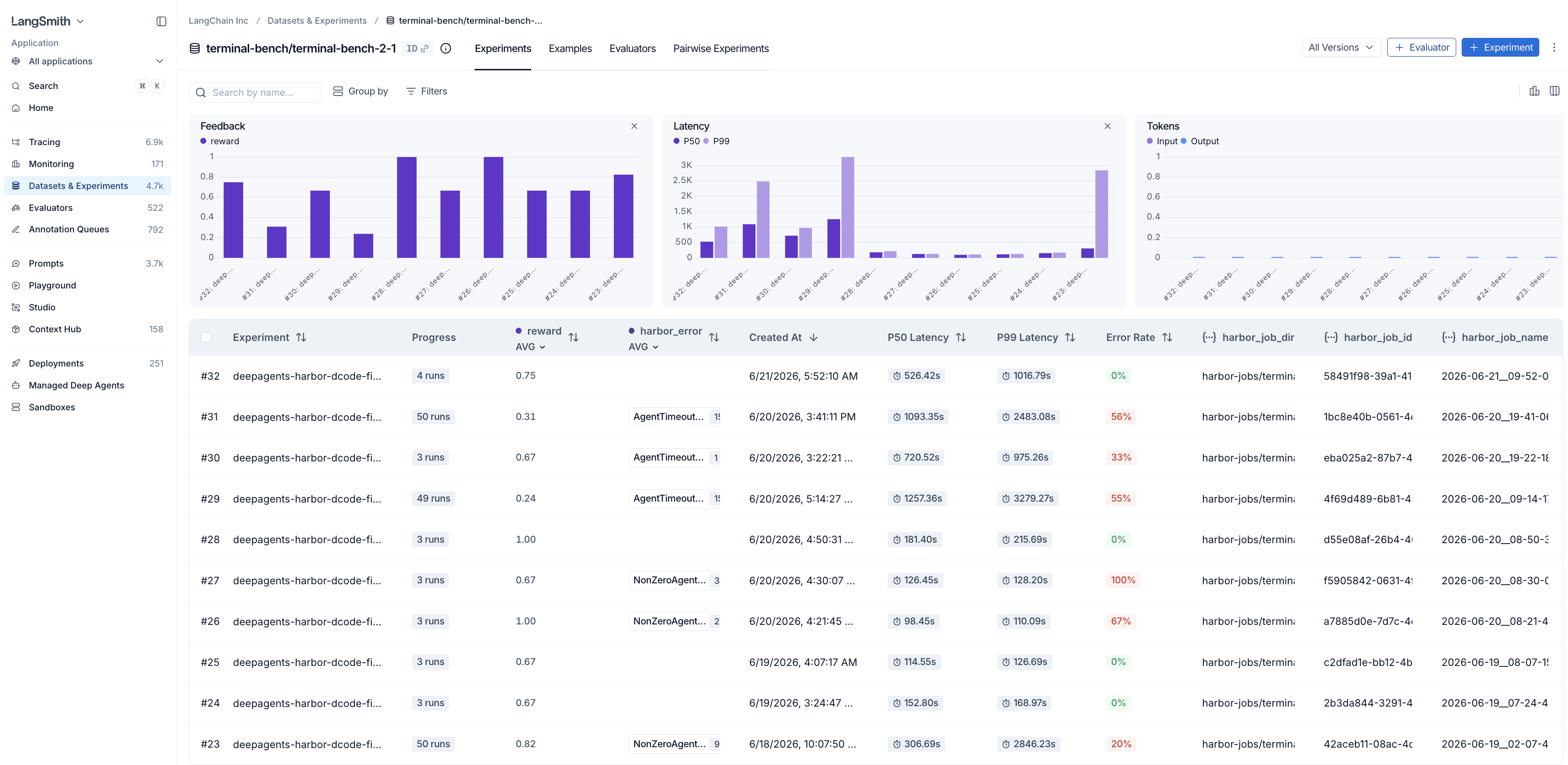
An experiment is an entire run on a given dataset. To view the specific experiments and their respective scores and statistics for a given dataset, click into it.
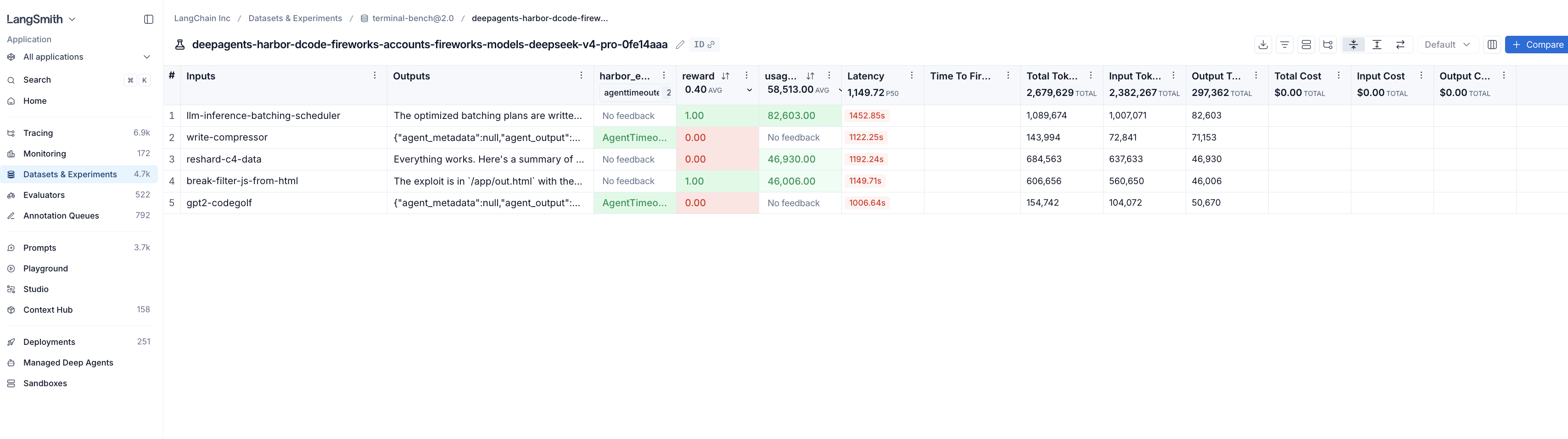
We believe integrating traces into evals lets you further refine your evals, and in turn better understand and improve your agents. The score tells you whether a trial passed; the trace tells you why.
The result: a full eval stack for agents
Put together, this is a complete stack for evaluating agents, where each layer does one job well:
- Harbor - the eval harness that orchestrates trials.
- Deep Agents - for building the agents under test.
- LangSmith sandboxes - the isolated cloud execution environment.
- LangSmith - the system of record for datasets, experiments, traces, and scores.
And the part you bring stays small:
- Your agent, with or without tracing.
- Your dataset, remote from a registry or local on disk.
- Your cloud sandbox — LangSmith, with
-e langsmith. - Your UI view —
--plugin langsmith.
If you have a LangSmith account and a dataset, you can try the whole thing by installing Harbor with the langsmith extra, which brings both the LangSmith sandbox environment and the eval plugin. Then set your LangSmith and model credentials, and turn on tracing so the agent's traces attach to the experiment:
pip install "harbor[langsmith]"
export LANGSMITH_API_KEY="<LANGSMITH_API_KEY>"

export LANGSMITH_PROFILE=prod
export LANGSMITH_TRACING=true
export LANGSMITH_PROJECT=harbor-deepagents
export FIREWORKS_API_KEY="<FIREWORKS_API_KEY>"
harbor run \
--agent langgraph \
--model fireworks:accounts/fireworks/models/glm-5p2 \ # agent
--ak project_path=./deep-agent --ak graph=deep_agent \
-d terminal-bench@2.0 \ # dataset of tasks
-e langsmith \ # cloud environment
--plugin langsmith Read the Harbor integrations docs to get started. For more on running evals in Harbor, see Run evals.