

Agent work usually falls into one of two patterns. Some tasks are ad hoc: you ask for help, the agent gathers context from a few tools, reasons through what changed, gives you an answer, and the work is done. Other tasks follow a recognizable pattern and depend on the same instructions and context, use the same tools, and require consistent judgment each time they run.
A lot of AI products treat both patterns as one-off chat. That works for quick questions, but it breaks down when the work repeats. You end up rewriting prompts, rebuilding context, and relying on a chat thread to act like an operating process. Fleet is built around the idea that agents should match the work requirements. There’s a General Purpose Chat that handles ad hoc tasks, while Specialized Agents handle recurring work with durable instructions, scoped tools, triggers, subagents, and memory.
Here’s how it works.
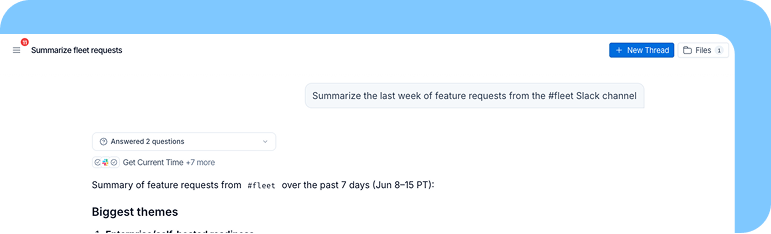
General Purpose Chat is for low-setup work
Imagine you are back from a week of vacation and need to catch up on Slack threads, GitHub PRs, Linear tickets, and calendar invites. The work spans several tools, requires judgment, and may produce a long summary or a set of next steps. Once it’s done, you probably do not need that exact task to run again next week.
General Purpose Chat is built for that kind of request. You can ask Fleet to handle broad work across your workspace without deciding which tools, prompts, or skills the agent should have ahead of time. It can access your workspace integrations, manage context through the file system, and use a virtual computer when the task needs a real environment for code, files, or data analysis.
You ask for the thing you need, Fleet executes the task, and the thread can end when the work is done.
Specialized Agents are for work you do repeatedly
Recurring work needs a more durable setup. Weekly planning updates, inbox management, customer research briefs, and backlog maintenance tasks should not depend on someone re-explaining the same expectations every time. A planning agent can check Linear every Monday, summarize what shipped, flag blocked work, and draft the update in the format your team expects. An inbox agent can classify new emails, draft replies, escalate customer issues, and remember which messages you want to handle yourself.
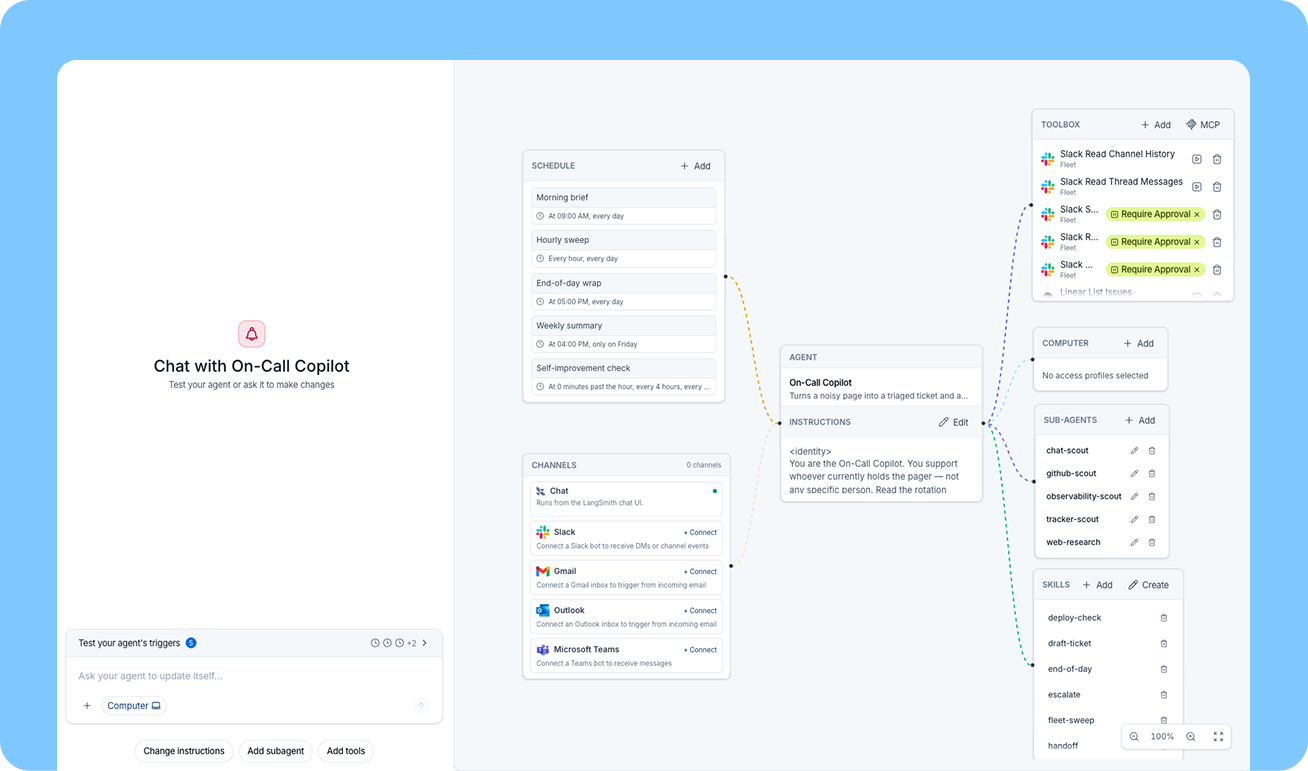
Specialized Agents give recurring work a stable home. You can configure the structure yourself by defining the agent’s instructions, choosing its model, attaching tools, adding skills, creating subagents, and connecting triggers or schedules. Or you can describe the task to Fleet in plain language, and Fleet will help build the right agent structure for you.
A useful ad hoc task can start in General Purpose Chat. When that task becomes part of how the team works, Fleet can turn it into a Specialized Agent with durable instructions, scoped tools, memory, and the right way to run. You still have control over the setup, but you do not have to start from a blank configuration screen.
What Specialized Agents let you define
Specialized Agents are useful because the configuration is consistent across runs.
Instructions: The agent's prompt defines its role, decision rules, output format, escalation behavior, and boundaries, which keeps repeated work consistent.
Tools: A Specialized Agent gets the specific tools it needs for the job, keeping the agent focused on the work it was built to do.
Models: You can choose the model for the main agent and for individual subagents. A supervisor agent might use a stronger model for planning or review, then smaller models for narrower subtasks. this allows you to optimize model selection for speed, cost, and performance.
subagents: subagents give a Specialized Agent callable specialists with their own instructions, tools, and model choices. This helps offload context-intensive tasks into subagents with their own conversation history, ensuring you don’t pollute the context of the main agent.
Skills: Specialized Agents can use workspace skills that are shared across the company and private skills scoped to that agent. This gives recurring work a reusable knowledge base without exposing every instruction to every agent in the workspace.
Triggers and schedules: Specialized Agents can run on a schedule or in response to events from tools like Slack, Gmail, Outlook, and Teams. A Gmail trigger can start a run for every new email sent to your inbox. A scheduled trigger can run the same agent every morning or every week.
Computer Access: When an agent needs a real environment for code, files, or analysis, Computer Access can be part of the agent's setup. In General Purpose Chat, Computer Access can be enabled on a per-thread basis, so context is isolated for each chat. In a Specialized Agent, it is part of the agent's environment, with the option to scope a single Computer across threads. This is useful when you want to maintain context across runs.
The biggest difference is how memory persists across tasks
General Purpose Chat has thread-level context, which fits temporary work. The thread holds what happened, and when the thread is done, the work is done.
Specialized Agents have memory scoped to the job. They can remember facts, update them over time, and use them on future runs without needing to be reminded.
Take a product-manager agent that manages Linear tickets and watches GitHub PRs. Over time, it can learn that one engineer prefers backend issues, another wants tickets broken into smaller pieces, and the PM wants release-blocking bugs escalated immediately. Those facts should not live in a prompt someone rewrites every Monday. They should become part of the agent's working memory.
This is what makes a Specialized Agent feel different from a saved chat. Its instructions are stable, but its memory can evolve as the work changes, and its memory can be tailored for each specific agent.
When to use each agent type
Task shape matters more than task difficulty. A one-off task can be complex, and a recurring task can be straightforward. The best way to think of it is whether the job you’re working on is a reusable pattern.
In short: use General Purpose Chat when the work is broad or temporary, and use a Specialized Agent when the work has become a responsibility you want to delegate repeatedly.
What this enables
Fleet lets teams start with assistance and graduate repeated work into delegation.
You can begin in General Purpose Chat by asking Fleet to catch you up, research an account, summarize documents, analyze a CSV, or draft a response. Many of those tasks will stay one-off, which is fine. They should remain lightweight.
When a pattern keeps coming back, Fleet lets you give it a durable form. The agent gets the right instructions, tools, skills, triggers, subagents, and memory. The team no longer depends on the person who remembers how to prompt the task. The work has an owner that can run again.
This is the reason Fleet has two agent types. Some agents help with immediate, open-ended tasks. Others take on recurring responsibilities and improve as they build job-specific memory. Fleet supports both because teams need both patterns to get real work done with agents.
To get started, you can try Fleet free. To dive into more of the technical details, read the docs.
