

Key Takeaways
- A good harness gives your agent the right prompts, tools, and skills. But deploying long-running agents in production requires durable execution, memory, multi-tenancy, human-in-the-loop, and observability. This infrastructure lives underneath the harness and keeps the agent running reliably across crashes, deploys, and long-running tasks.
- Durable execution is the foundation everything else depends on. Agents that run for minutes or hours, pause for human approval, or survive mid-run deploys all need checkpointed execution that can stop, resume, and retry across process boundaries. Streaming, human-in-the-loop, cron jobs, and concurrent message handling all build on top of it.
- Production agents need open and model-agnostic infrastructure. Deep Agents is MIT licensed, agents are exposed via open protocols (MCP, A2A), and memory lives in your own PostgreSQL. Teams keep full visibility into how their agent works and the ability to change it without a rewrite.
Deploying long horizon agents in production requires purpose-built infrastructure. This guide covers durable execution, memory, HITL, observability, and how deepagents deploy ships it all to production.
To build a good agent, you need a good harness. To deploy that agent, you need a good runtime.
The harness is the system you build around the model to help your agent be successful in its domain. That includes prompts, tools, skills, and anything else supporting the model and tool calling loop that defines an agent. The runtime is everything underneath: durable execution, memory, multi-tenancy, observability, the machinery that keeps an agent running in production without your team reinventing it.
This guide walks through the production requirements that surface once you deploy agents, the runtime capabilities that meet them, and how deepagents deploy packages those capabilities into something you can ship.
Runtime capabilities for production agents
Throughout this section, "the runtime" refers to LangSmith Deployment (LSD) and its Agent Server: LSD runs agents in production, and Agent Server is the interface for assistants, threads, runs, memory, and scheduled jobs. The table below maps each production requirement to the runtime primitive that meets it.
Durable execution
Agents work by running a loop: Given a prompt, the model reasons, calls tools, observes the results, and repeats until it decides the task is complete.

Unlike a typical web request that returns in milliseconds, this loop can span minutes or hours. A single run might make dozens of model calls, spawn subagents, or wait indefinitely for a human to approve a draft. A crash, deploy, or transient failure anywhere in that loop shouldn't erase the work leading up to it.
In practice, you feel it in two places:
Long runs need to survive infrastructure failures. A research agent spending twenty minutes gathering sources and synthesizing findings can't afford to restart from scratch if the worker process dies: the agent already paid for the tokens and executed the tool calls. What you want is resumption from the last completed step, with all prior state intact.
Agents need to be able to stop and wait. An agent that pauses for a human to approve a transaction doesn't know if the human will respond in thirty seconds or three days. Tying up a worker process or a client connection for that entire window isn't viable. The agent needs to truly stop: free resources, release workers, then pick up later exactly where it left off.
Both requirements are solved by the same thing: durable execution.
- Agents run on a managed task queue with automatic checkpointing, so any run can be retried, replayed, or resumed from the exact point of interruption.
- Each super-step of graph execution writes a checkpoint to the persistence layer (PostgreSQL by default), keyed by a
thread_idthat acts as a persistent cursor into the run. - When a worker crashes, the run's lease is released and another worker picks it up from the latest checkpoint.
- When an agent waits for human input, the process hands off its slot and the run sleeps indefinitely until resumed.
- Configurable retry policies control backoff, max attempts, and which exceptions trigger retries on a per-node basis.

Durability is the foundation the rest of this list depends on. Because execution can pause and resume across process boundaries, agents can wait indefinitely for human input, run in the background, survive deploys mid-run, and handle concurrent inputs without corrupting state.
Memory
Agents need two different kinds of memory, and the distinction matters.
Short-term memory is what the agent accumulates within a single conversation. The messages exchanged, the tool calls made, the intermediate state built up across a run. This lives in the checkpoint for the thread, scoped to a thread_id, and disappears (conceptually) when the conversation ends. A follow-up message on the same thread sees everything that came before on that thread.
Long-term memory is what the agent carries across conversations. This can include user preferences learned across conversations, project conventions and best practices, or a knowledge base enhanced with each new query. None of this belongs to any single thread. It's user-level or organization-level context that should persist across every conversation the agent has. Checkpoints alone can't do this, because checkpoint state is scoped to a single thread.
.png)
Long-term memory is what the Agent Server's built-in store is for. It's a key-value interface where memories are organized by namespace tuples (for example, (user_id, "memories")) and persisted across threads. Your agent writes to the store in one conversation and reads from it in the next. Backed by PostgreSQL by default, it supports semantic search via embedding configuration so agents can retrieve memories by meaning rather than exact match, and you can swap in a custom backend if you need different storage characteristics. The namespace structure is flexible: scope by user, assistant, organization, or any combination that fits your data model.
Because memory that accumulates over months is some of the most valuable data the system produces, it matters where it lives. The store is queryable directly via API, and if you self-host, it lives in your own PostgreSQL instance. Keeping this data in a standard format you control is what lets you migrate between models, analyze it, or build on top of it outside the agent itself.
Multi-tenancy
The moment your agent serves more than one user, a set of problems appears that didn't exist in single-player mode. These break down into three distinct concerns, and the Agent Server handles each with its own primitive.
Isolating one user's data from another. User A's run should only touch User A's threads, and only read User A's memories. Custom authentication runs as middleware on every request: your @auth.authenticate handler validates the incoming credential and returns the user's identity and permissions, which get attached to the run context. Authorization handlers registered with @auth.on.threads, @auth.on.assistants.create, and so on then enforce who can see or modify what by tagging resources with ownership metadata on creation and returning filter dictionaries on reads. Handlers are matched from most specific to least, so you can start with a single global handler and add resource-specific ones as your model grows.
Letting the agent act on behalf of a user. Agents often need to call third-party services using the user's credentials—reading their calendar, posting to their Slack, opening a PR in their repo. Agent Auth handles the OAuth dance and token storage for this pattern, so the agent gets user-scoped credentials at runtime without you managing the refresh flow yourself. The user authenticates once; the agent can act on their behalf across subsequent runs.
Controlling who can operate the system itself. Separate from end-user access, there's the question of which members of your team can deploy agents, configure them, view traces, or change auth policies. RBAC handles this operator-level access control.
The three layers compose: end users authenticate via your auth handler, the agent calls third-party services via Agent Auth, and your team operates the deployment under RBAC policies.
.png)
Human-in-the-loop (HITL)
Agents work by running a loop: given a prompt, a model reasons and decides to call tools, observes the results, and repeats until it decides it has completed the task at hand. Most of the time you want that loop to run uninterrupted. That’s where the value comes from. But sometimes you need a human in the middle of the loop at key decision points.
There are two common situations where this comes up:
- Reviewing a proposed tool call. Before the agent executes a consequential action (sending an email, executing a financial transaction, deleting files), you want a human to see exactly what it's about to do and decide how to respond. Take the email case: the agent drafts a message and pauses before sending. You can approve it as-is, edit the subject or body before it goes out, or reject it with a reason and specific edit requests so the agent can revise and try again.
- An agent asking a clarifying question. Sometimes an agent reaches a decision point it can't resolve on its own, not because it lacks a tool but because the right answer depends on human judgment or preference. Rather than guessing, the agent can surface the question directly: "I found three config files matching that pattern. Which one should I modify?" or "Should this deploy to staging or production?" Your answer becomes the return value of the interrupt, and the agent continues from exactly where it stopped.
The Agent Server handles this with two primitives: interrupt() pauses execution and surfaces a payload to the caller; Command(resume=...) continues it with the human's response. Together they let you build approval gates, draft review loops, input validation, and any workflow where a human needs to weigh in mid-execution.

Under the hood, interrupt() triggers the runtime's checkpointer to write the full graph state to durable storage, keyed by a thread_id that acts as a persistent cursor. The process then frees resources and waits indefinitely. Unlike static breakpoints that pause before or after specific nodes, interrupt() is dynamic: place it anywhere in your code, wrap it in conditionals, or embed it inside a tool function so approval logic travels with the tool. When Command(resume=...) arrives—minutes, hours, or days later—the resume value becomes the return value of the interrupt() call, and execution picks up exactly where it stopped. Because resume accepts any JSON-serializable value, the response isn't limited to approve/reject: a reviewer can return an edited draft, a human can supply missing context, a downstream system can inject computed results. When parallel branches each call interrupt(), all pending interrupts are surfaced together and can be resumed in a single invocation, or one at a time as responses come back.
Real-time interaction
Human-in-the-loop is an interaction mode where execution can pause for a person to review or provide input—sometimes immediately, sometimes much later. Separately, there are “live session” problems that show up when the agent is actively working while the user is present: making progress visible (streaming) and coordinating concurrent messages (double-texting).
Streaming
An agent that takes thirty seconds to produce a response leaves the user staring at a spinner with no signal about whether it's making progress, stuck, or about to fail. They also can't start reading the answer until the whole thing is done. Streaming solves both: partial output flows to the client as the agent produces it, so the user sees the response materialize in real time.
The Streaming API supports several modes depending on what granularity you want: full state snapshots after each graph step, state updates only, token-by-token LLM output, or custom application events. You can also combine them. Run streaming (client.runs.stream()) is scoped to a single run; thread streaming (client.threads.joinStream()) opens a long-lived connection that delivers events from every run on a thread, useful when follow-up messages, background runs, or HITL resumptions all trigger activity on the same thread.
Thread streaming supports resumption via the Last-Event-ID header: the client reconnects with the ID of the last event it received, and the server replays from there with no gaps. Without this, every dropped connection means the client either misses output or has to start over.
Double-texting
The second real-time problem: a user sends a new message while the agent is still working on the previous one. This happens constantly in chat UIs. Someone types a question, realizes they meant something slightly different, and fires off a correction before the first run finishes. We call this double-texting, and the runtime has to take a position on how to handle it.
There are four strategies, and the right one depends on your application:
enqueue(the default): The new input waits for the current run to finish, then processes sequentially.reject: Refuse any new input until the current run finishes.interrupt: Halt the current run, preserve progress, and process the new input from that state. Useful when the second message builds on the first.rollback: Halt the current run, revert all progress including the original input, and process the new message as a fresh run. Useful when the second message replaces the first.
.png)
interrupt gives the snappiest chat feel but requires your graph to handle partial tool calls cleanly (a tool call initiated but not completed when the interrupt hits may need cleanup on resume). enqueue is the safest default—no state corruption, at the cost of making the user wait.
Guardrails
Not every production concern can be expressed as "run the loop durably." Some have to shape the loop itself: intercepting model inputs, filtering tool outputs, enforcing limits on expensive operations. These policies belong in code, not in a prompt. They need to run every time, not whenever the model happens to remember them.
Two cases make this concrete:
- Redacting sensitive data before the model sees it. A customer support agent processes user messages containing PII (names, emails, account numbers). You don't want the model to see them, you don't want them in traces, and compliance likely requires redaction before logging. This has to happen before every model call, deterministically.
- Capping expensive operations. An agent that can call a paid external API needs a hard ceiling on how many calls it makes per run, because a confused model will otherwise happily call it fifty times and burn through your budget before lunch.
Both are handled by middleware, which wraps the agent loop at defined hooks—before_model, wrap_model_call, wrap_tool_call, after_model—so policies execute deterministically around every relevant step.

LangChain ships built-in middleware covering the common cases: PIIRedactionMiddleware, ModelRetryMiddleware, ModelFallbackMiddleware, ToolCallLimitMiddleware, SummarizationMiddleware, HumanInTheLoopMiddleware, OpenAIModerationMiddleware, and you can write custom middleware for application-specific policies.
Middleware is open source, but it only really pays off when it runs inside the agent runtime. When it does, those same policies become part of every interaction mode the runtime supports—streaming, human-in-the-loop pauses/resumes, retries, background runs, and long-lived threads. In practice, that means your guardrails and instrumentation aren’t “best effort”: they consistently wrap every model call and every tool call, at the exact points you expect, no matter what the agent is doing.
Observability
You don't know what an agent will do in production until you run it. Unlike a traditional application where you can reason about behavior from the code, an agent's execution path depends on the model's choices at runtime: which tools to call, what to pass them, how to interpret the results, and when to give up and try something else. When something goes wrong, you can't just re-read the function. You need to see what actually happened.
A support ticket says "the agent kept asking the same question over and over." Without traces, you're guessing from the user's description. With traces, you see the full execution tree: the user's message, the model's planned response, the tool it called, the result it got back, the next message it generated, the loop it fell into. You can filter by cost to find runs that burned through tokens, by error to find runs that failed, by user to see what a specific customer experienced. You can spot patterns across thousands of runs that no individual trace would reveal.
Every LangSmith Deployment is automatically wired to a tracing project. You get the full execution tree out of the box—model calls, tool calls, subagent runs, middleware hooks—with structured metadata you can query by user, time window, cost, latency, error state, feedback, or custom tags.
Traces are the foundation of the improvement loop:
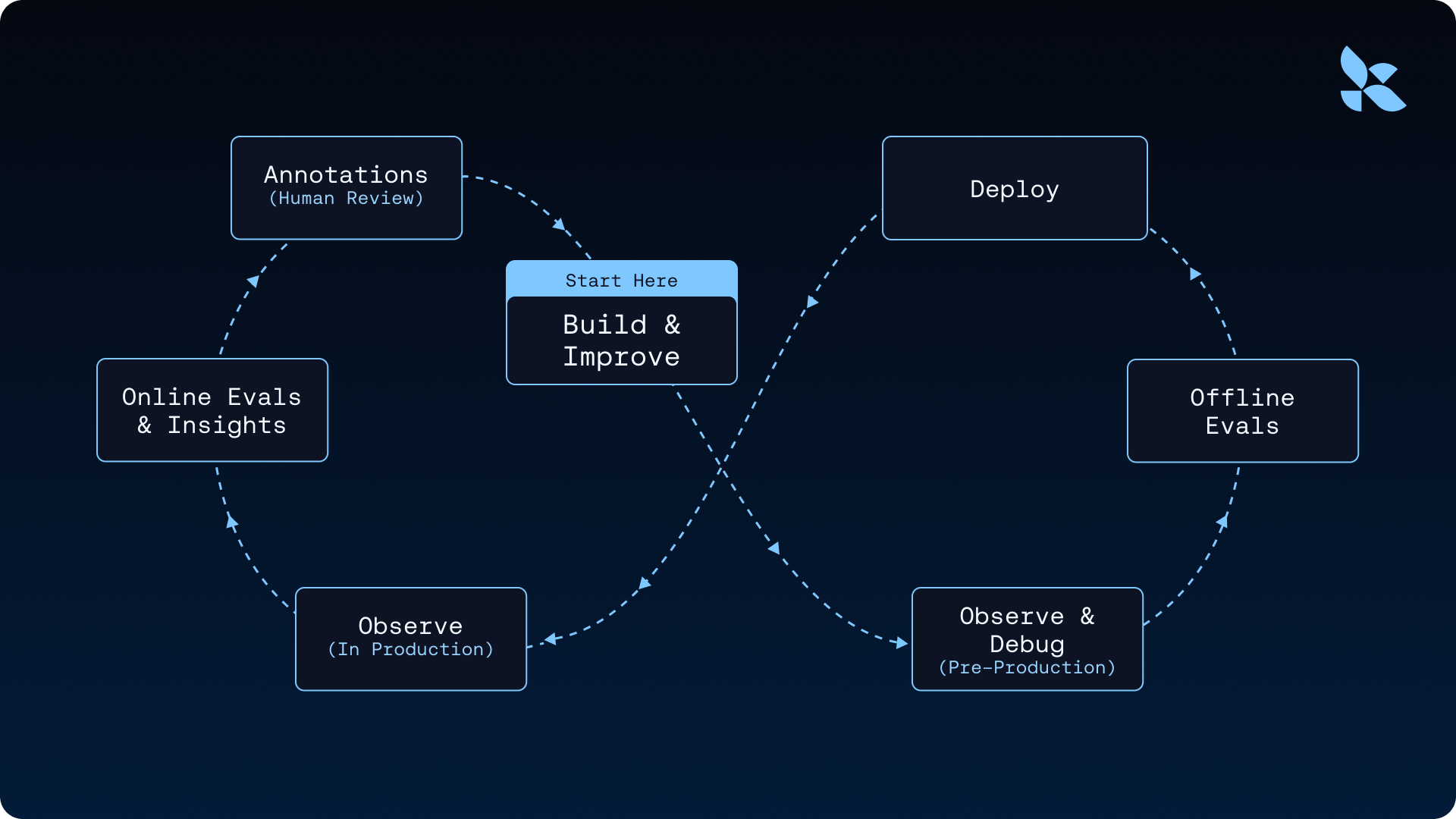
Polly, the LangSmith AI assistant, analyzes traces and surfaces insights—common failure modes, slow tool calls, repeated patterns—so you're not reading thousands by hand. Online Evals run LLM-as-judge or custom scorers against production traces automatically, so regressions get caught as they happen. We used this loop to improve Deep Agents by 13.7 points on Terminal Bench 2.0 by only changing the harness—the whole argument for why the agent improvement loop starts with a trace is worth reading in full.
Time travel
Observability tells you what happened. Time travel lets you ask what would have happened if something had gone differently.
The motivating case is debugging a run that went off the rails. Your agent made a bad decision at step 5 of a 20-step run: it called the wrong tool, misread a tool result, or asked a clarifying question when it should have kept going. You want to understand why, and you want to try alternatives without re-running the whole thing from scratch. More generally, any time an agent's path depends on state at a particular checkpoint, you want the ability to rewind to that checkpoint, change the state, and let the rest of the run unfold differently.
Because every super-step writes a checkpoint, every point in a run's history is already a snapshot you can return to. Time travel makes this explicit: pick a checkpoint from a thread's history, optionally modify its state, and resume from there. The modified checkpoint forks the thread's history. The original stays intact, and the new path runs forward as its own branch. LLM calls, tool calls, and interrupts all re-trigger on replay, so forks exercise the real agent loop rather than a stub of it.
.png)
This unlocks patterns that are hard to build otherwise: debugging why the agent chose tool A when it should have chosen tool B, comparing two prompts against the same upstream context, recovering from a run that went sideways by rewinding to the last good state, or exploring counterfactuals across many forks to understand model behavior. The LangSmith Studio UI gives you a visual interface for all of this; the API is what most production debugging workflows end up using.
Code execution
An agent that can only call the tools you pre-wired is limited to what you anticipated. An agent that can run arbitrary code is general-purpose: it can install dependencies, clone repos, execute tests, run data analysis, generate documents, and render plots. This is the gap between "chatbot with function calling" and "agent that can actually do things."
Arbitrary code execution requires isolation. If the agent runs rm -rf / on your host, you have a bad day. If it reads your environment variables, it exfiltrates your API keys. You need a boundary between the agent's execution environment and everything you care about, and you need it before the agent writes its first command.
In Deep Agents, isolation happens through sandbox backends. When you configure a backend that implements SandboxBackendProtocol, the agent automatically gets an execute tool for running shell commands in the sandbox alongside the standard filesystem tools. Without a sandbox backend, the execute tool isn't even visible to the agent. Supported providers include Daytona, Modal, Runloop, and LangSmith Sandboxes, and you can swap between them with a single configuration change.
LangSmith Sandboxes (currently in private preview) are worth a specific callout because they're built to integrate with the rest of the runtime. Templates define container images, resource limits, and volumes declaratively. Warm pools pre-provision sandboxes with automatic replenishment, eliminating cold start latency for interactive agents. And the auth proxy solves a problem every team hits eventually: the agent needs to call authenticated APIs, but putting credentials inside the sandbox is a security risk. The proxy runs as a sidecar, intercepts outbound requests, and injects credentials from workspace secrets automatically—the sandbox code calls api.openai.com with no headers, and the proxy adds the right Authorization header on the way out. Secrets never enter the sandbox, and the agent can't exfiltrate what it can't see.
.png)
One piece of security guidance worth repeating: sandboxes protect your host, not the sandbox itself. An attacker who controls the agent's input (via prompt injection in a scraped webpage, a malicious email, a poisoned tool result) can instruct the agent to run commands inside the sandbox. The sandbox keeps the attacker off your machine, but anything inside the sandbox—including credentials placed there directly—is compromised. The auth proxy pattern exists for exactly this reason.
Integrations
Agents are most useful when they plug into the systems people and organizations already use. A coding agent becomes more powerful when it can reach into GitHub, Linear, and your CI system. A research agent becomes more useful when its output feeds into your publishing pipeline. An internal agent becomes a platform when other agents can call it as a building block. If every one of those integrations is a hand-rolled adapter, your agents stay isolated. The boundary between "agent" and "everything else" becomes a wall.
Open protocols solve this by letting agents and external systems discover and talk to each other without either side knowing the other's implementation. The Agent Server provisions three integration surfaces automatically.
MCP
MCP (Model Context Protocol) is the open standard for connecting agents to tools and data sources. Every LangSmith Deployment automatically exposes an MCP endpoint, making your agent discoverable by any MCP-compliant client—Claude Desktop, IDEs, other agents, custom applications—without you writing adapter code. In the other direction, your agent can call out to any MCP server (Linear, GitHub, Notion, and hundreds of others) to reach tools and data your users already have.
A2A
A2A (Agent-to-Agent) is the analogous standard for agent-to-agent communication, and every deployment exposes an A2A endpoint automatically as well. This is what makes multi-agent architectures across deployments tractable: an orchestrator agent in one deployment can discover and call worker agents in another using a protocol both sides understand, with no hand-rolled HTTP contracts.
Webhooks
Webhooks handle the outbound case: your agent finishes a run, and you want to kick off something downstream without polling. Pass a webhook URL when creating a run, and the server POSTs the run payload to that URL on completion. This is how you chain agent runs into existing workflows—a research run completes and triggers a publishing pipeline, a daily summary finishes and notifies Slack, a compliance check completes and writes to your audit log. Headers, domain allowlists, and HTTPS enforcement are all configurable for production environments.
Cron
The agents we've been talking about so far are reactive: a user sends a message, the agent responds. But a lot of valuable agent work is proactive—it happens on a schedule, with no human triggering it.
Two patterns in particular:
- Sleep-time compute. Agents that do useful work during idle periods, so users benefit from accumulated thinking rather than on-demand latency. A research agent that runs nightly to catch up on new papers in your field. A prep agent that reviews tomorrow's calendar and drafts briefing notes before you start your day. A triage agent that classifies overnight support tickets so your team walks into a prioritized queue. The work happens while nobody's waiting, and the output is ready when the user shows up.
- Health and monitoring loops. Agents that periodically check on something and act (or escalate) if they find an issue. An on-call agent that reviews alerts every fifteen minutes, an agent that monitors your staging environment for regressions, a compliance agent that sweeps for policy violations on a cadence. These need the same durability, tracing, and auth as user-facing runs, but no user is waiting on them.
The Agent Server has cron jobs built in, so scheduled runs get the same durability, tracing, and auth guarantees as any other run—no separate scheduler to maintain, no second observability story to wire up. You pass a standard cron expression (UTC) and an input, and the server triggers runs on schedule.
Two flavors fit different patterns:
- Stateful cron (
client.crons.create_for_thread) ties the schedule to a specificthread_id, so every triggered run appends to the same conversation. This fits agents that should see their own history—a daily research agent that builds on yesterday's findings, or a monitoring agent that remembers what it already flagged. - Stateless cron (
client.crons.create) spins up a fresh thread for each execution, which fits batch-style work that doesn't need continuity between runs. Control thread cleanup viaon_run_completed:"delete"(the default) removes the thread when the run finishes,"keep"preserves it for later retrieval viaclient.runs.search(metadata={"cron_id": cron_id}).
.png)
Every cron run shows up in tracing, respects auth handlers and middleware, and supports resumption on failure—a cron that hits a transient model outage at 3am doesn't silently fail, it gets retried like any other run. One operational note: delete crons when you're done with them. They keep running (and billing) until you do.
We see enterprise teams with varying deployment requirements, so the runtime supports cloud, hybrid, and self-hosted deployments. The capabilities are the same regardless of where you run it.
deepagents deploy
deepagents deploy is the packaging step that deploys your agent on the runtime described above. You define your agent in deepagents.toml, and the CLI bundles your configuration and deploys it as a LangSmith Deployment with all of the aforementioned features.

Memory uses a virtual filesystem with pluggable backends that gives agents both ephemeral scratch space and persistent cross-conversation storage. Deep Agents support memory scoped to users or assistants (or both)!
Sandbox providers (LangSmith Sandboxes, Daytona, Modal, Runloop, or custom) are a single config value. When a sandbox is present, the harness automatically adds an execute tool. Sandbox lifecycle (thread-scoped vs assistant-scoped) is handled through graph factories. Credentials inside sandboxes are managed through the sandbox auth proxy so API keys never appear in sandbox code or logs.
Skills and instructions are auto-detected from your skills/ directory and AGENTS.md. MCP servers are picked up from mcp.json. The name field is the only required config value; everything else has sensible defaults.
The result is a deployment that can evolve over time, with new skills, tools, and memory policies, without a full rewrite. For the complete set of production considerations (credential management, async patterns, frontend integration, and more), see the going-to-production guide.
Open Harness
There's a growing trend in agent infrastructure where moving to a managed solution comes with reduced builder choice—lock-in to a single model provider, a closed harness, or harness functionality hidden behind APIs (like server-side compaction that generates encrypted summaries you can't use outside one ecosystem). The practical consequence is that teams lose visibility into how their agent actually works, and lose the ability to change it when it doesn't.
One note on vendor lock-in: deepagents deploy is built to avoid it. The harness is MIT licensed and fully open source, agent instructions use AGENTS.md (an open standard), and agents are exposed via open protocols—MCP, A2A, Agent Protocol. There's no model or sandbox lock-in, and nothing about the harness is a black box. The default harness offers the following capabilities:

Additionally, Deep Agents allows you to inspect, customize, and extend every layer of agent behavior, including rate limits, retry logic, model fallback, PII detection, and file permissions via LangChain's middleware.
Take your agents to production
The capabilities this guide outlines—durable execution, memory, multi-tenancy, guardrails, human-in-the-loop, observability, sandboxed code execution, scheduled runs, and more—are the infrastructure requirements production agents can't function without. deepagents deploy packages all of it so teams don't have to assemble it from scratch, and keeps the stack open, configurable, and yours throughout.
Building agents is a deeply iterative cycle: traces surface what's actually happening in production, online evals catch regressions before they compound, and memory means the agent gets more useful over time. The infrastructure isn't just supporting the live agent, it's the foundation for making it better.
If you want to try it out, the quickstart will get you from deepagents.toml to a running deployment in minutes. For the full production playbook including memory scoping, sandbox lifecycle, credential management, guardrails, and frontend integration, see the going-to-production guide. For a deeper look at the runtime itself, see the LangSmith Deployment and Agent Server docs.