What is LangSmith?
Learn what LangSmith is, how it fits into the Agent Development Lifecycle (ADLC), and why teams use it to test, deploy, monitor, and improve agents.
September 7, 2026
LangSmith is our framework-agnostic agent engineering platform for teams who want to continually improve agents. LangSmith traces provide the record for what your agent did: the model calls, retrieved context, tool behavior, and feedback. LangSmith then helps you enrich these traces with human feedback and data from evals, and leverage that data to improve agents.
.png)
We call this feedback loop the Agent Development Lifecycle (ADLC). It connects building an agent and its context, testing it against known cases before release, deploying it into production, and monitoring live behavior so failures inform the next version. Offline evals compare a new version against known examples before release. Online evals grade live traffic after release, when teams typically have no pre-written expected answer to compare against the agent’s response.
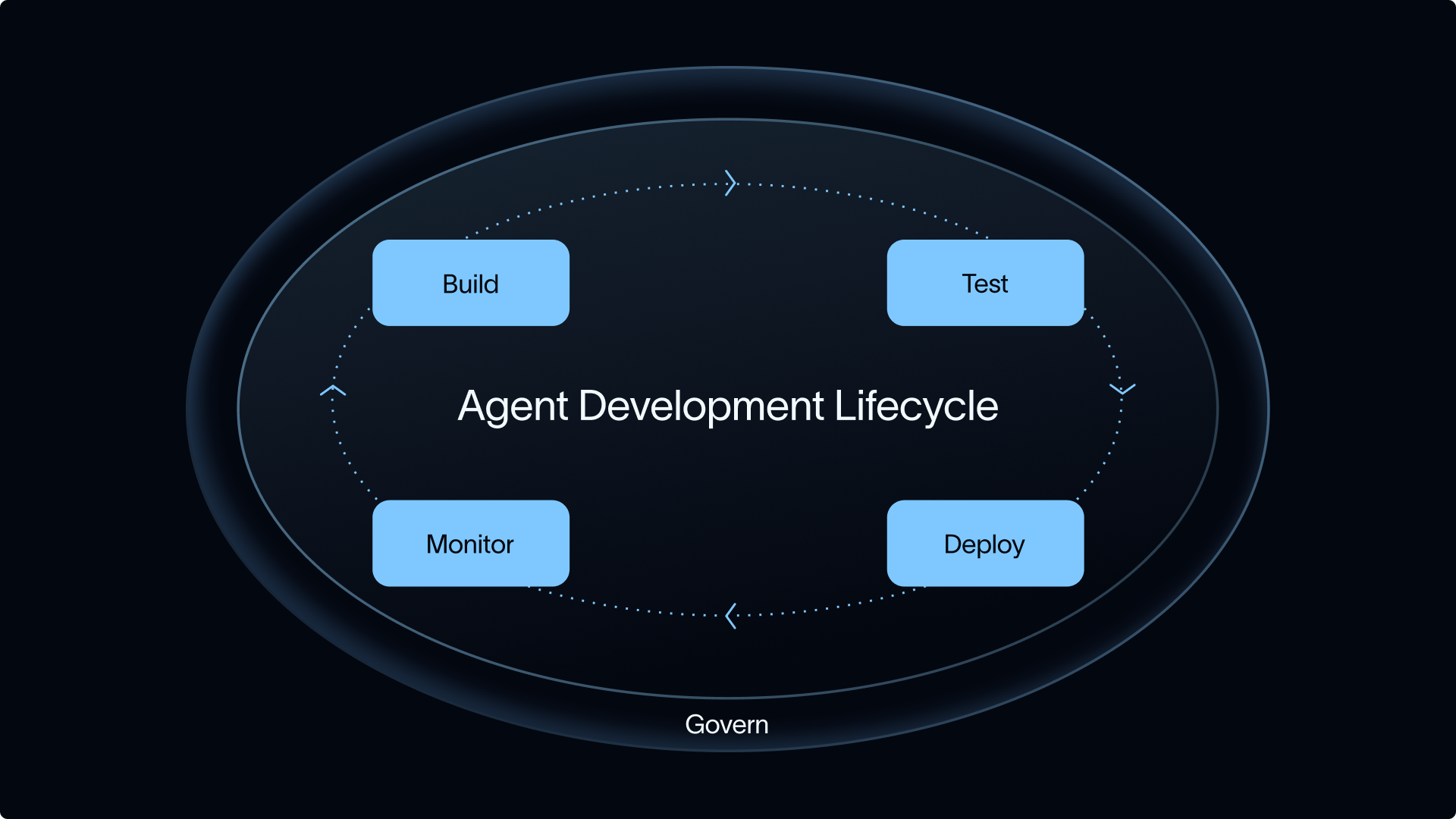
LangSmith is framework-agnostic by design. It works with any model, framework, and cloud, and supports open standards such as MCP, A2A, and Agent Protocol. Teams using Deep Agents, LangGraph, the LangChain framework, or any other stack can use LangSmith to trace, evaluate, and monitor their agents in one place.
LangChain, the company, and its products
LangChain is the company behind several open-source frameworks and the commercial LangSmith platform. The LangChain framework provides building blocks for tool-calling agents, while LangGraph is an agent runtime for stateful workflows and Deep Agents is an agent harness for long-running work. LangSmith provides tracing, evals, deployment, and production monitoring for agents built with any of those tools or another stack.
LangChain’s open-source projects cover different levels of agent complexity. Deep Agents uses the LangChain framework’s agent building blocks and the LangGraph runtime, and a LangChain or Deep Agents agent can run inside a larger LangGraph workflow when a team needs durable state or explicit control.
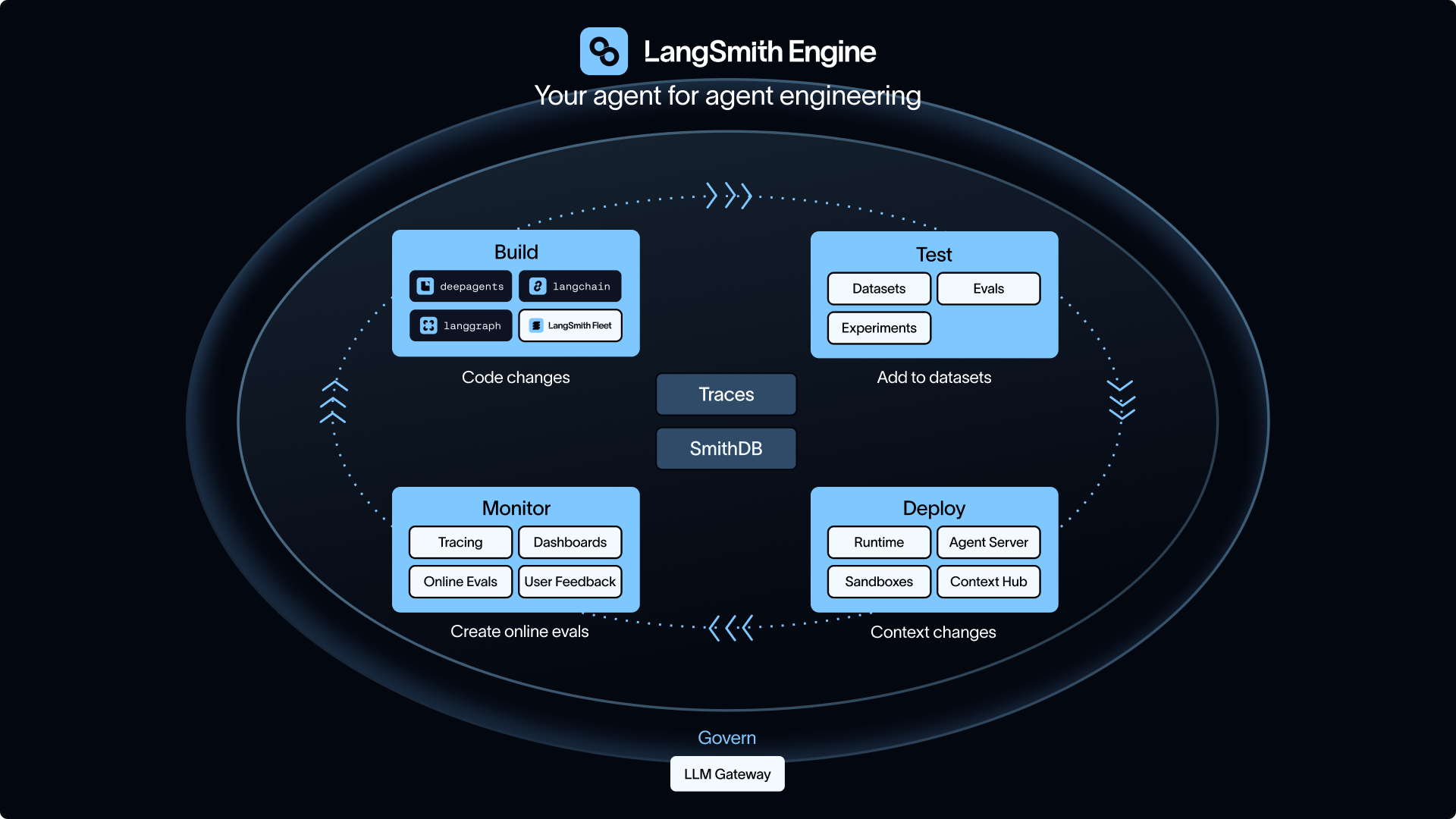
The table below maps LangChain’s main products and LangSmith capabilities to the Agent Development Lifecycle and explains when each is useful.
The lifecycle begins with the Build stage, where teams choose the framework and workflow, then configure the tools, permissions, and instructions the agent will use.
Build
Teams first decide how much of the agent to assemble themselves, from a ready-made harness to lower-level building blocks.
Use Deep Agents when the agent needs to plan across many steps and keep its context useful as the run grows. It includes filesystem tools for moving large results out of the model's context window, subagents for specialized work, skills that load on demand, and memory that persists across runs.
LangChain is a better fit for a straightforward agent or a team that wants to assemble its own harness. Its core abstraction is a model running in a tool-calling loop. LangChain connects that loop to models, tools, retrieval systems, and data sources, while middleware can add summarization, approval steps, or a verifier around it.
Use LangGraph when a standard agent loop no longer describes the workflow. A rental application system, for example, might use a model to extract income and rental history, fixed code to score the application, and human review for borderline cases. LangGraph makes those steps and transitions explicit while providing durable execution, streaming, persistence, and human-in-the-loop control.
Building an agent also means defining the workflows, permissions, and instructions that govern how it behaves. Fleet lets workflow owners build and run agents without code, with permissions and approvals around their work. Context Hub gives teams version control, review, and environment promotion for the instructions, skills, tools, and agent configurations that determine what an agent can do and how it responds.
Once the agent runs, the next question is whether it behaves the way it should before it reaches users.
Test
Before release, teams use offline evals to test proposed changes against examples where they already know what a good result looks like. In LangSmith Evaluation, teams create or curate a dataset, define evaluators, and run the agent or application against those examples. They can then compare experiment results with a baseline to check for regressions before a change reaches users.
Offline evals are strongest when the dataset preserves known-good answers, known-bad traces, expected tool choices, required output formats, or examples from dogfooding and support. If the output needs a field in a JSON schema, deterministic checks are usually enough. If the agent needs to answer in a way that is grounded, policy-compliant, and useful, an LLM-as-a-judge or human reviewer can capture a quality dimension a string check misses.
Code-writing agents need a real execution check. They cannot be judged only on whether an answer sounds plausible. They need an isolated environment where failures are observable and file changes stay contained. Sandboxes and Deep Agents sandbox backends provide those environments, so test results reflect what the agent did rather than what it claimed it would do.
Once the agent passes its evals, it needs a runtime that can hold state, handle interruptions, and keep running between requests.
Deploy
LangSmith Deployment is the managed runtime for agents built with LangGraph or LangChain. It also supports Google ADK and other frameworks through documented SDK and wrapping approaches.
Managed Deep Agents is currently in private beta as an API-first hosted runtime for the open-source Deep Agents harness, adding durable threads, streaming, memory, file access, sandbox execution, and tracing.
In production, Sandboxes give agents hardware-virtualized microVMs for code execution, file inspection, dependency installs, or sandbox-backed tools without giving that work direct access to the main infrastructure.
Agents need controls around the model calls they make in production. LLM Gateway is currently in beta and proxies those calls through LangSmith, giving teams a single place to enforce spend limits, redact PII before requests reach a model provider, centralize credentials, and see model costs alongside the rest of the agent run.
Once an agent is live, real traffic can reveal patterns and failures that did not appear in pre-release evals. Monitor is where teams find and investigate them.
Monitor
In live traffic, an agent can return a response while using the wrong tool, skipping an approval, relying on stale context, looping through unnecessary calls, or creating downstream work for another team. LangSmith Observability keeps input and model calls next to the evidence a developer needs for debugging. With this, teams can inspect retrieved context and tool behavior alongside latency, feedback, evaluator scores, and the final response.
For multi-turn agents, thread-level views and online evaluators grade behavior after a conversation completes rather than treating each run as an isolated event.
Online evals can run across production traces or use filters and sampling to focus on selected traffic. Because live interactions often have no reference answer, grading criteria focus on policy misses, task completion, drift, escalation quality, unsafe tool use, and recurring failure patterns.
Automated scoring does not cover every production judgment. When human review is needed, Annotation Queues let product managers, lawyers, clinicians, analysts, support leads, and other domain experts review traces. Their feedback can include corrected outputs or examples added to a dataset for future evals.
Improve
At production volume, human review covers the traces that need judgment. Insights surfaces common usage patterns and failure modes across the rest, and LangSmith Chat helps developers debug long traces, understand conversation threads, analyze experiments, and optimize prompts.
LangSmith Engine watches production traces, clusters failures into named issues, diagnoses root causes, and resolves or recommends fixes. It can also propose online evaluators and pull failing traces into datasets so each fix expands future eval coverage.
SmithDB is the data layer underneath that experience, built for agent traces that contain hundreds of nested spans, multimodal content, and long-open spans that arrive over time. At launch, SmithDB handled trace tree loads at P50 92ms, run filtering at P50 82ms, and full-text search at P50 400ms.
How production feedback informs the next Build cycle
After a team identifies an issue in the Monitor stage, that finding can inform the next Build stage in several ways. A trace can be added to an eval dataset, and a recurring failure identified by Engine can lead to a proposed fix and new eval coverage. A policy miss may call for a new LLM Gateway rule, an instruction update in Context Hub, or a human-in-the-loop checkpoint in LangGraph. A sandbox failure can become a behavioral test for future changes to a coding agent.
The diagram below shows where each product sits across the ADLC and how production evidence flows back into the next build cycle.
When teams need LangSmith
Teams need LangSmith when agent behavior affects customers, business systems, regulated data, code execution, shared workflows, or high-volume internal operations.
Teams running a single low-risk AI application with a small user base typically start with framework-level tracing and manual output checks. As that application begins taking actions, calling tools, or handing work to another team, traces and eval history become the debugging record when failures happen. At that point, logs alone rarely answer the questions:
- Which step caused the failure?
- Did this change introduce a regression?
- How often does a policy miss appear in live traffic?
- Which traces need human review?
- Did the same failure recur after the fix?
LangSmith is also the right layer when the build stack is mixed. A platform team can keep custom infrastructure while product teams use Deep Agents, LangGraph, the LangChain framework, or any other stack, and still share the same traces, evals, Annotation Queues, deployment controls, and failure triage across every agent and every release.
To see the Agent Development Lifecycle on your own stack, start by tracing one agent in LangSmith.